
Split testing content works because it replaces opinion with evidence, and evidence consistently outperforms guesswork when the goal is more conversions or better engagement. Marketers who test headlines, calls-to-action, and layouts see measurable lift instead of hoping a redesign “feels” better. Start testing when a page or email gets enough traffic to reach a clean result, typically a few hundred conversions a month, and prioritize your highest-traffic landing pages or your most-opened email sequences first.
Three things happen almost immediately once you start:
- Higher conversion rates. Documented headline and value-proposition tests in B2B contexts have driven 20% to 40% relative improvements over generic messaging.
- Clearer audience signals. You learn what your visitors actually respond to, not what your team assumes they’ll respond to.
- Lower rollout risk. You catch a bad idea on 50% of your traffic instead of 100% of it.
Run your first test at 95% confidence, the standard most experiment platforms use before declaring a winner, and consider a service like Mysearchhero if you want testing and content production running on autopilot rather than managed manually.
Key Takeaways
Split testing content works because it replaces assumption with evidence, and that evidence compounds into measurable revenue gains over time.
| Point | Details |
|---|---|
| Start with traffic thresholds | Prioritize split testing once a page or email reaches enough volume to hit statistical significance within weeks. |
| Expect realistic uplift | Headline and value-proposition tests in B2B settings often show 20% to 40% relative improvement over baseline. |
| Use 95% confidence | Treat 95% confidence as your standard threshold before declaring any winner. |
| Avoid the classic traps | Don’t change multiple variables at once, stop early, or run overlapping tests on the same audience. |
| Document every result | Log hypothesis, sample size, duration, and outcome so each test builds a reusable playbook. |
Table of Contents
- Why Split Test Content: What A/B Testing Actually Means
- Why Split Testing Matters: Real Benefits and Realistic Impact
- What to Test First: A Practical Content Checklist
- Sample Size, Confidence, and Avoiding False Winners
- Step-by-Step: Run a Split Test in Six Moves
- Common Pitfalls and How to Avoid Them
- Tools and Integrations for Split Testing
- Split Testing vs. Other Optimization Methods
- Why We Prioritize Hypothesis-Driven Testing
- Ready to Turn Testing Into a System, Not a One-Off Project?
- Sources
- FAQ
Why Split Test Content: What A/B Testing Actually Means
Split testing is a controlled experiment that shows two or more versions of the same content to separate audience segments, then measures which version performs better against a defined goal. That’s the whole idea. No mysticism, no “creative intuition,” just a measurable comparison.
Marketers usually work with three variations of this idea:
- A/B testing changes one variable, like a headline or button color, and compares it against the original. This is the default choice for most teams because it’s fast to set up and easy to interpret.
- Multivariate testing (MVT) changes several elements at once and measures how combinations interact. It requires far more traffic because the number of combinations grows exponentially, so it only makes sense for high-volume pages.
- Split-URL testing compares two entirely different page designs or layouts, often hosted at different URLs. Use this when you’re testing a full redesign rather than a single element.
If you’re running under 10,000 monthly visitors to a given page, stick with sequential A/B tests. Save multivariate testing for flagship pages where you have the traffic to support it, and reserve split-URL tests for structural redesigns where a single-element swap won’t tell you enough.
Why Split Testing Matters: Real Benefits and Realistic Impact
Split testing matters because it turns marketing decisions into measurable ones, and measurable decisions compound. A single winning headline might only move conversions by a few percentage points. Run that same discipline across ten pages over a year, and you’re looking at a meaningfully different revenue line.
The benefits go beyond conversion rate. A/B testing improves audience understanding, reduces the risk of a bad full-scale rollout, and sharpens creative alignment with what your audience actually wants, not what your design team assumes they want. It also replaces guesswork with something closer to proof: testing small, isolated changes like a headline or CTA button lets you isolate cause and effect, then scale the winning version across other pages and campaigns.
The improvement ranges are worth knowing before you set expectations. Effective headline and value-proposition testing in B2B settings has produced 20% to 40% relative improvements over baseline messaging, though results vary by industry, traffic quality, and how well the original hypothesis was built.
Picture a mid-size service business testing its homepage headline. A 25% lift on a page converting at 2% doesn’t sound dramatic until you multiply it across a year of traffic. That’s the compounding effect: small, validated wins stacked on top of each other outperform one big redesign gamble almost every time.
Pro Tip: Use a small split test to de-risk a major rollout before committing your full budget or dev time to it. If your new landing page design underperforms on 50% of traffic, you’ve saved yourself from rolling out a loser to everyone.
For B2B teams specifically, don’t stop at top-of-funnel conversions. A variant that lifts form fills can quietly reduce lead quality, so track what happens after the click, not just at it.
What to Test First: A Practical Content Checklist
Not every element deserves equal attention. Some changes take five minutes and move the needle; others take a sprint and barely register. Prioritize accordingly.
Fast wins (low effort, high signal):
- Headline and value proposition, the single highest-leverage element on most pages
- Call-to-action copy and button placement
- Primary hero image or featured graphic
- Email subject lines, preview text, and sender name
Higher-effort tests:
- Form length and required fields
- Full page layout or navigation structure
- Pricing page presentation and tiering
Match your test to funnel stage by optimizing your Google Ads landing pages: a practical guide for marketers. Top-of-funnel content, like blog headlines or ad creative, should be tested for engagement and click-through. Mid-funnel pages, like landing pages built to convert, need CTA and form tests. Bottom-funnel pages, like pricing or checkout, deserve the most caution since a losing variant there costs you real revenue immediately.
Sample Size, Confidence, and Avoiding False Winners
Before you launch anything, pick one primary metric and one or two guardrail metrics you’re watching to make sure you’re not winning on paper while losing on revenue.
Sample size is where most tests go wrong. You need enough visitors per variant to detect a real difference, not statistical noise. The two levers that determine your required sample size are your baseline conversion rate and your Minimum Detectable Effect (MDE), the smallest lift you actually care about catching. Smaller MDEs and lower baseline conversion rates both demand larger samples, sometimes dramatically larger.
Most ecommerce and marketing teams treat 95% confidence as the standard before calling a winner, meaning there’s only a 5% chance the result is a fluke. Larger samples and running variants concurrently, rather than sequentially, both improve reliability and cut down on false positives caused by seasonal or day-of-week effects.
“Peeking” is the classic mistake here. Checking results daily and stopping the moment you see a lead feels efficient, but it inflates your false-positive rate substantially. A test that looks like a winner on day 3 often regresses to the mean by day 14. Set your sample size and duration before you start, and don’t touch the result until you hit both.
Pro Tip: After you implement a winner, run a quick validation test on a different segment or traffic source before rolling it out everywhere. It costs you a week and protects you from a fluke result driving a permanent decision. Keep an eye on guardrail metrics like engagement time and revenue per visitor while you do it.
Step-by-Step: Run a Split Test in Six Moves
1. Pick your opportunity and write a hypothesis. Look for high-traffic pages or high-open-rate emails with room to improve. A usable hypothesis template: “If we change [element] to [variation], then [metric] will improve because [reason].” Specificity here saves you from vague, unactionable results later.
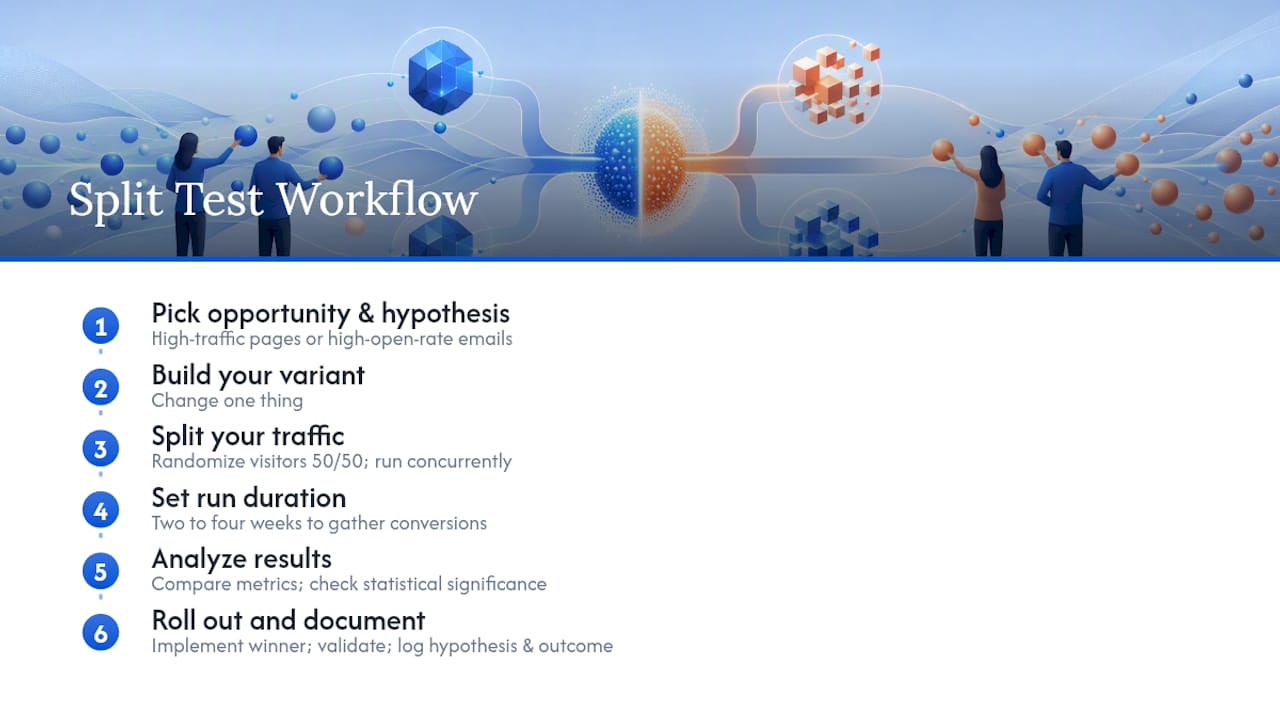
2. Build your variant. Change one thing if you’re running a standard A/B test. Resist the urge to redesign everything at once, or you’ll never know which change actually mattered.
3. Split your traffic. Randomize visitors 50/50 (or another even split for multiple variants) so each version sees a comparable audience. Run variants concurrently, never sequentially, to avoid contaminating results with time-based swings.
4. Set your run duration. Most content tests need two to four weeks to account for weekly traffic cycles and gather enough conversions to hit statistical significance. Don’t stop early because the trend looks promising. Trends shift.
**5.
6. Roll out and document. Implement the winning variant, then validate it works on a different segment before declaring it permanent everywhere. Log the hypothesis, sample size, duration, and outcome in a shared playbook so the next test builds on this one instead of starting from zero.
Common Pitfalls and How to Avoid Them
Most failed tests aren’t failures of the method, they’re failures of discipline. Harvard Business Review flags overinterpreting small samples, running overlapping tests, and never tying results back to business metrics as the three most common traps.
- Changing too many variables at once. Fix: isolate one element per test unless you have the traffic for true multivariate testing.
- Stopping early. Fix: commit to your sample size and duration in advance, then don’t peek.
- Underpowered tests. Fix: calculate required sample size before launch, not after.
- Overlapping tests on the same audience. Fix: use exclusive audience segments so one test doesn’t contaminate another.
- Mis-specified KPIs. Fix: define your primary metric before launch, not after you see which variant is winning.
Quick hygiene check before every launch: randomized split, single hypothesis, defined duration, one primary metric, no overlapping experiments on the same segment.
Tools and Integrations for Split Testing
You’ll generally need four categories: an experiment platform, a landing-page or CMS builder, an email platform, and an analytics connector. Optimizely handles complex multivariate and full-stack experiments well for teams with development resources. Unbounce is built specifically for split-testing landing pages without needing a developer. Mailchimp and ActiveCampaign both offer built-in subject line and content split testing for email, which covers a huge share of what small marketing teams actually need to test. Contentsquare adds behavioral analytics, like where visitors hesitate or drop off, that helps you form better hypotheses before you even launch a test.
Before running anything, check your integration stack: analytics tagging, tag manager configuration, server-side event tracking if you’re testing checkout flows, and a connection back to your CRM if you need to see how a “winning” variant performs on actual sales, not just clicks.
Split Testing vs. Other Optimization Methods
Split testing needs volume to work. If your page gets fewer than a few thousand monthly visitors or converts fewer than roughly 100 people a month, you likely won’t reach statistical significance in a reasonable timeframe.
Below that threshold, run qualitative diagnosis first: user interviews, session recordings, and heatmaps to understand where friction actually lives.
Why We Prioritize Hypothesis-Driven Testing
Random changes based on a hunch waste more time than they save, even when they occasionally work. A documented hypothesis forces you to state what you expect and why, which means you learn something concrete whether the test wins or loses. That’s the real value split testing delivers: not just a better headline, but a growing record of what your specific audience actually responds to.

Document every test, share the results across your team, and connect them to revenue or lead quality, not just top-line clicks. At Mysearchhero, continuous testing runs as part of the content production workflow itself, feeding insights back into what gets published next rather than treating testing as a separate, occasional project.
Ready to Turn Testing Into a System, Not a One-Off Project?
Running split tests manually works fine for one page. It gets harder to sustain across a full content calendar, multiple landing pages, and ongoing email sequences, especially for a small team wearing five hats already. Mysearchhero bundles content production, distribution, and CTR optimization into a monthly workflow built for local and service businesses that need consistent output without a full in-house team running it. If you’d rather have testing and publishing happen on autopilot than manage another tool stack yourself, that’s exactly the gap it’s built to close.
Sources
- Split testing guide (ActiveCampaign)
- Avoid the pitfalls of A/B testing (Harvard Business Review)
- 9 Benefits of A/B Testing for Higher Conversions | VWO
FAQ
What is split testing and how does it work?
Split testing shows two or more content versions to separate audience segments at the same time, then measures which version performs better against a defined metric. It works by isolating one variable so any performance difference can be attributed directly to that change.
Is split testing the same as A/B testing?
Split testing and A/B testing are used interchangeably by most marketers, though “split testing” sometimes refers specifically to split-URL tests comparing entirely different page versions. A/B testing is the more common single-variable form within the broader category.
What is the primary reason for splitting a test into different stages?
Testing in stages, starting with a hypothesis, then a controlled traffic split, then analysis, ensures results are statistically valid and attributable to the change being tested rather than to random variation or outside factors like seasonality.
How do I run a split test?
How long should a split test run?
Most content tests need two to four weeks to capture full weekly traffic cycles and reach enough conversions for statistical significance. Stopping earlier, even with a promising trend, raises the risk of a false winner.
What should I test first if I’m just getting started?
Start with your headline or value proposition since it typically has the highest impact for the lowest effort, followed by your call-to-action copy and, for email, your subject lines and sender name.