
TL;DR:
- A well-designed content calendar transforms reactive publishing into proactive, focused marketing efforts, especially for small teams.
- It provides clarity on goals, deadlines, responsibilities, and content quality, reducing stress and avoiding calendar drift.
You’ve got a blog post due Friday, three social media slots to fill by Monday, and a product launch coming up next month, but nobody on your team knows who owns what or when anything goes live. That scramble is expensive, stressful, and completely avoidable. A well-built content calendar turns reactive guessing into proactive publishing, giving your team clarity on what to create, when to publish, and who handles each piece. This guide walks you through the full process, from setting goals to reviewing results, so your marketing runs on a schedule instead of a crisis.
Table of Contents
- Why a content calendar matters for small business marketing
- Gathering your prerequisites: Goals, content, and workflow
- Step-by-step: Building your content calendar
- Common mistakes and troubleshooting content calendar pitfalls
- Verifying results: Reviewing, optimizing, and adapting your calendar
- What most guides miss: Lightweight calendars win for busy teams
- Take the next step: Simplify your content calendar creation
- Frequently asked questions
Key Takeaways
| Point | Details |
|---|---|
| Define your goals | Set clear objectives and audit your content to create a purposeful calendar. |
| Focus on execution-critical fields | Track only essential information to streamline workflows and avoid duplication. |
| Build flexibility into your calendar | Use workflow buffers and treat your calendar as a living system to prevent chaos. |
| Regularly review and optimize | Audit performance metrics and update your calendar strategy for continued success. |
Why a content calendar matters for small business marketing
Most small businesses start their content the same way: someone panics, something gets published, and the results are impossible to measure. Without a structured plan, you miss seasonal opportunities, repeat yourself without realizing it, and burn out your team on last-minute requests. A content calendar fixes the root problem by giving your marketing a backbone.
Here are the core benefits of running a structured calendar:
- Consistency: Publishing on a predictable schedule builds audience trust and keeps your brand visible.
- Team alignment: Everyone knows what’s coming, who owns it, and where it stands in the workflow.
- Strategic focus: You plan content around business goals, not whatever feels urgent today.
- Measurement: When content is planned and dated, you can actually compare performance across time periods.
- Reduced stress: Deadlines are visible weeks in advance, so nobody is scrambling the night before.
One thing most small teams overlook is how a calendar connects to content quality. When writers and marketers know their topics two weeks ahead, they have time to research, gather data, and create something genuinely useful. Last-minute content is almost always lower quality. Successful content marketing examples consistently share one trait: they were planned well in advance with a specific audience goal in mind.
Following editorial calendar best practices also means building in approval time, revision rounds, and publishing buffers so nothing falls through the cracks.
“A practical content calendar workflow starts by defining goals, auditing existing content, clarifying audience needs, and deciding content types, formats, and publishing frequency.”
Pro Tip: Even a basic spreadsheet with four columns (topic, format, date, owner) will outperform a mental to-do list every single time. Start simple and build from there.
Having outlined why structured planning beats improvisation, we now move into the crucial preparatory stage: what you need before creating your content calendar.
Gathering your prerequisites: Goals, content, and workflow
Before you open a spreadsheet or sign up for a tool, you need to answer three questions: What are you trying to accomplish? What have you already published? And who is your audience? Skipping this prep work means building a calendar on a shaky foundation.
Define your goals. Your content calendar should serve real business objectives. Do you want to increase organic traffic by 30 percent? Generate more leads through gated downloads? Build authority in a specific niche? Write those goals down and keep them visible as you plan content types and topics. Goals determine everything else.
Audit your existing content. Pull a list of every blog post, video, social asset, and email campaign from the last 12 months. Note what performed well, what flopped, and where the gaps are. You might find you’ve covered beginner topics extensively but ignored decision-stage content. That gap becomes your next planning priority.
Clarify your audience. Demographics matter, but content preferences matter more. Does your audience prefer short how-to videos or long-form guides? Do they engage more on LinkedIn or Instagram? Survey your existing customers, check your analytics, and review comment sections to build a real picture of what your audience wants to read or watch.
Choose your content types and formats. Once you know your goals and audience, decide which formats to use: blog posts, short-form videos, email newsletters, social posts, podcasts, or a combination. Not every channel is worth your time. Pick the ones that align with where your audience spends their attention.
Set a realistic publishing frequency. A content calendar kickoff that promises daily blog posts for a three-person team will collapse within two weeks. Be honest about your bandwidth. It’s far better to publish one great piece per week than four mediocre ones.
Here’s a quick comparison of popular tools for setting up your calendar:
| Tool | Best for | Cost | Flexibility |
|---|---|---|---|
| Google Sheets | Small teams, simple workflows | Free | High, fully custom |
| Notion | Flexible databases, solo creators | Free/paid tiers | Very high |
| Trello | Visual kanban-style planning | Free/paid tiers | Medium |
| Dedicated apps | Larger teams, approvals, integrations | Paid | Very high |
| Airtable | Complex workflows, linked databases | Free/paid tiers | Extremely high |
The right tool is the one your team will actually use consistently. A sophisticated platform nobody logs into is worse than a shared Google Sheet everyone updates daily.
A practical content calendar workflow starts by defining goals, auditing existing content, clarifying audience needs, and deciding content types, formats, and publishing frequency, in that order.
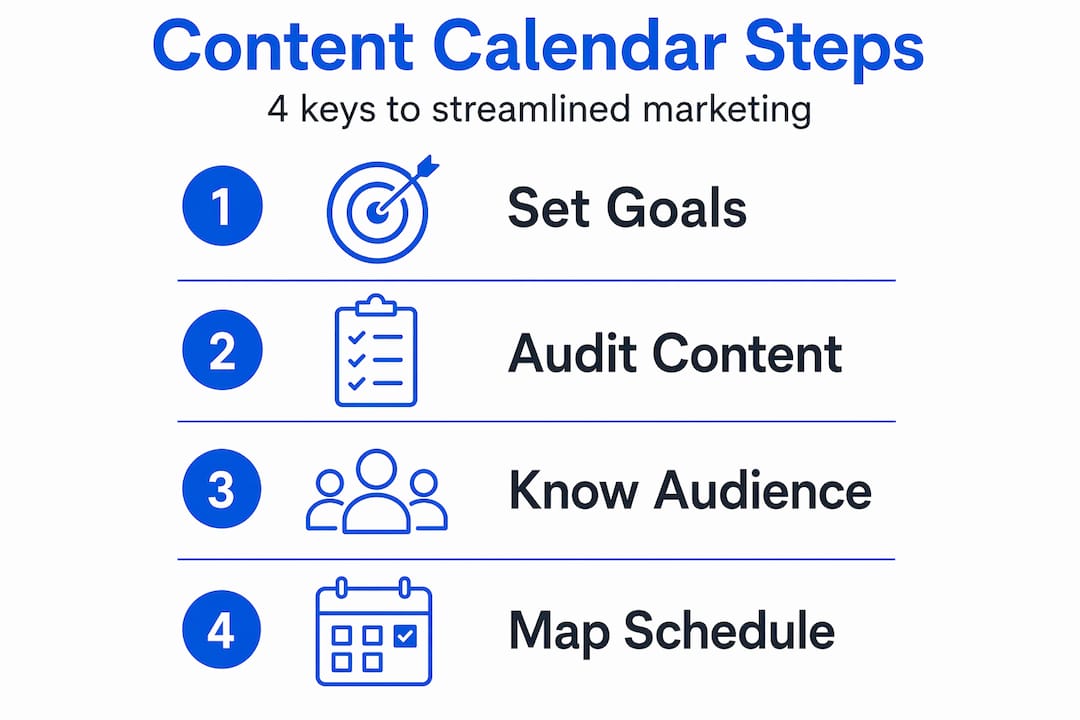
With the pre-planning work clear, you’re ready to build your content calendar step by step.
Step-by-step: Building your content calendar
Now comes the actual construction. This doesn’t have to be complicated, but it does need to be intentional. Follow these steps to go from blank sheet to functioning calendar.
- Define your calendar fields. Decide what information each content item needs to track. At minimum, that’s topic, format, publish date, owner, and workflow status.
- Brainstorm and add content ideas. Pull from your goal priorities, content audit gaps, keyword research, seasonal events, and audience questions. Add every viable idea to a backlog column first.
- Assign publish dates. Move ideas from backlog to scheduled slots based on your publishing frequency. Plan 90 days out at a high level, 30 days with assigned owners, and lock the next 7 to 14 days with firm deadlines.
- Assign owners. Every content item needs one person responsible for it, not a team. Shared ownership is no ownership.
- Set workflow stages. Use clear status labels: idea, in progress, in review, approved, scheduled, published. This gives anyone a quick read on where every piece stands.
Here’s a breakdown of minimum versus advanced calendar fields:
| Field | Minimum calendar | Advanced calendar |
|---|---|---|
| Topic/title | ✓ | ✓ |
| Content type/format | ✓ | ✓ |
| Target publish date | ✓ | ✓ |
| Owner/assignee | ✓ | ✓ |
| Workflow status | ✓ | ✓ |
| Target keyword | ✓ | |
| Channel/platform | ✓ | |
| CTA or goal | ✓ | |
| Performance metrics | ✓ | |
| Notes/briefs | ✓ |
According to content calendar best practices, at minimum a calendar should capture topic, content type, target publish date, owner, and workflow status. Everything else is optional and should be added only when it solves a real problem your team faces.

Reviewing calendar field examples from real marketing teams reveals that teams often add too many fields early on, then stop updating them, which defeats the purpose entirely.
A strong calendar workflow setup also includes a clear approval chain so content doesn’t stall in limbo between “done” and “published.”
Pro Tip: Build buffer days into every piece. If a blog post is due Friday, mark the internal deadline as Wednesday. Real life always introduces delays, so give yourself room without missing the publish date.
Now that your calendar is built, let’s tackle common challenges and how to keep it dynamic.
Common mistakes and troubleshooting content calendar pitfalls
Even teams with good intentions run into calendar problems. The most common issues aren’t about the tool or the template. They’re about habits and expectations.
Watch out for these mistakes:
- Over-scheduling: Filling every slot with ambitious content pieces your team can’t realistically produce leads to burnout, missed deadlines, and a calendar nobody trusts.
- Ignoring flexibility: Rigid calendars that can’t accommodate trending topics, breaking news, or unexpected opportunities miss real engagement chances.
- Skipping workflow buffers: No buffer means one sick day or one revision request blows up your entire publishing schedule.
- Treating the calendar as a reporting tool: Your calendar is an execution tool. Don’t clutter it with analytics that belong in a separate dashboard.
- Lack of backlog: Without a backlog of ready-to-go ideas, you have nothing to pull from when a scheduled piece falls through.
Edge case tip: Only lock in content you are confident your team can execute on time. Keep a backlog of evergreen ideas and timely opportunities that can be slotted in quickly when something falls apart or when a trend creates a sudden opening.
Calendar drift is one of the most frustrating problems for busy teams. It happens gradually: a few pieces slip, dates get pushed, and suddenly your “two weeks ahead” calendar is barely one day ahead. Regular audits, weekly at minimum, catch drift before it becomes a crisis.
“To avoid calendar drift and last-minute fire drills, build workflow buffers and an approval process, and treat the calendar as a living system.”
The social content plan that boosts engagement follows the same logic: flexibility built into the system is not weakness, it’s resilience.
After addressing common errors, it’s vital to keep your calendar and strategy updated through ongoing review.
Verifying results: Reviewing, optimizing, and adapting your calendar
Building a content calendar is a start, not a finish line. The teams that get lasting results review their calendars regularly and update them based on real performance data, not gut feeling.
Build these review habits into your workflow:
- Weekly check-in (15 minutes): Confirm what publishes in the next 7 days, check workflow status of every in-progress piece, and flag anything at risk.
- Monthly review (60 minutes): Pull performance data for everything published that month. Look at traffic, engagement, conversions, and social reach. Compare results against the goals you set in your planning stage.
- Quarterly strategy refresh: Revisit your overarching goals. Have priorities shifted? Are certain content formats delivering far better results than others? Adjust your calendar plan accordingly.
For social media specifically, social media calendar optimization research shows that the most effective teams start with strategy, maintain a consistent weekly cadence, then analyze performance and feed those insights back into future planning.
Use your performance data to make specific decisions: if your how-to blog posts drive three times more traffic than your opinion pieces, schedule more how-to content. If Tuesday posts outperform Thursday posts on social, shift your schedule. Let the numbers lead you rather than assumptions.
Your marketing calendar reviews should also surface seasonal opportunities you might have missed. Looking at last year’s performance data often reveals that certain months drive big spikes in traffic you can capitalize on with planned content.
Pro Tip: Set a recurring monthly calendar audit on your team’s shared calendar. Treat it like a standing meeting, not an optional task. Teams that skip reviews always regress to reactive publishing within two months.
What most guides miss: Lightweight calendars win for busy teams
Most content calendar advice assumes you have a dedicated content team, a generous budget for tools, and hours each week to maintain a complex system. The reality for small businesses and lean marketing teams is very different.
Here is the uncomfortable truth: a detailed, multi-tab content calendar with 15 tracking fields is actually a liability for a small team. When a system takes longer to maintain than it takes to write the content, people stop updating it. And a calendar nobody updates is worse than no calendar at all.
Keeping the calendar lightweight when you already have a separate reporting system means you only track execution-critical fields to avoid duplicating work. That advice runs counter to what most “complete guide” articles recommend, but it reflects how real teams actually operate.
The best content calendars are the ones your team uses every single day without friction. That might mean a five-column Google Sheet instead of a full project management platform. It might mean planning only four weeks ahead instead of three months. It means resisting the urge to add fields “just in case” and only tracking what you genuinely act on.
Start simple. Build discipline around a small system. Then expand if the need genuinely arises, not because a best-practices guide told you to. Execution always beats planning. A published piece of average-quality content outperforms a perfectly documented but unexecuted content plan every single time.
The simple social content planning approach proves this point: teams that commit to a simple, consistent system generate far more output than those chasing the perfect workflow tool.
Take the next step: Simplify your content calendar creation
Building a content calendar from scratch takes real time and effort, especially when you’re already managing a full marketing workload. If you’d rather skip the setup and get straight to publishing content that drives results, there’s a smarter path.

MySearchHero takes the calendar creation work off your plate entirely. As a done-for-you SEO and content marketing service, every month you get published articles, backlinks, Reddit mentions, and AI-generated social posts pushed out through a fully automated pipeline. You don’t need to track workflow stages, assign owners, or chase down approvals. It all runs on autopilot, so your content calendar resources turn into actual published results without the manual grind. For SMBs and marketing managers who want consistent output without building an internal system from scratch, it’s the most efficient path forward.
Frequently asked questions
What is the minimum information a content calendar must track?
At minimum, your content calendar should track the topic, publish date, owner, content type, and workflow status. Everything else is optional until your team genuinely needs it.
How far ahead should you plan in a content calendar?
Experts recommend planning 90 days high-level, assigning work 30 days ahead, and locking the next 7 to 14 days to balance flexibility with preparedness.
How can small teams avoid calendar drift?
Audit your calendar weekly, build in workflow buffers, and treat the calendar as a living system that gets updated regularly, not a static document.
Can I use a content calendar for social media?
Yes, social media calendars use the same core principles but require weekly planning and strategy updates based on performance metrics to stay effective over time.