
A content repurposing strategy is a repeatable system for turning one piece of source content into multiple platform-native assets without duplicating the original message word for word. The workflow that works: extract the core insights into a single document, produce platform-specific drafts from that document, then schedule them on a staggered calendar. Done right, it multiplies reach and search visibility while cutting the time spent starting from scratch.
TL;DR:
- Successful content repurposing requires selecting high-performing, evergreen, and data-rich content that hasn’t been overdistributed or become outdated.
- Building a structured workflow with extraction, production, and scheduling stages ensures consistency, efficiency, and prevents bottlenecks in content creation.
- Content should be adapted to platform-specific formats with tailored hooks, length, and structure, while maintaining consistent brand voice and visual identity.
- Proper tagging, tracking, and focusing on a few key channels maximize measurable reach and engagement, avoiding overextension or content cannibalization.
- When done deliberately and with proper structure, repurposing enhances SEO, audience reach, and content lifespan without risking duplicate content penalties.
Table of Contents
- What Is Content Repurposing, and How Does It Differ From Crossposting?
- How Do You Choose Which Content to Repurpose First?
- Building the Extract, Produce, Schedule Workflow
- How Do You Adapt One Idea for Different Platforms?
- What Tools and Templates Do You Actually Need?
- Which Metrics Prove a Repurposing Campaign Is Working?
- Does Repurposing Hurt SEO by Creating Duplicate Content?
- A 30-Day Calendar: One Source Piece, 15+ Assets
- Legal and Copyright Considerations When Repurposing Content
- Repurposing Content for Different Audience Segments
- Keeping Brand Voice Consistent Across Repurposed Formats
- Common Pitfalls in Content Repurposing (and How to Avoid Them)
- Systems Beat One-Off Hacks
- A Done-for-You Option When You’d Rather Not Run the Pipeline Yourself
- Sources
- FAQ
What Is Content Repurposing, and How Does It Differ From Crossposting?
Content repurposing means transforming one piece of source material, a webinar, a long article, a podcast episode, into distinct formats built for different platforms and different reader intents. Crossposting is different: it’s publishing the same content, unchanged, across multiple channels. Reposting usually means resharing the exact same asset later for a second wave of visibility. Repurposing is the only one of the three that requires actual production work, and it’s the only one that survives search engine scrutiny.
The payoff shows up in four places. Efficiency: one research and writing cycle feeds a month of content instead of one post. Extended lifespan: a well-performing article from eighteen months ago can fuel five new assets instead of sitting untouched. SEO and AI visibility: search engines and AI answer engines both reward content that gets referenced, updated, and cited across formats over time, according to Search Engine Land’s guidance on repurposing for LLM visibility. Audience diversification: your best insight might convert on LinkedIn but get ignored in an email, and repurposing tests that without extra research.
Repurpose instead of creating from scratch when:
- The source content already ranks or performs well organically.
- It contains data, a framework, or an original argument, not just commentary on someone else’s news.
- You have not yet distributed it beyond its original channel.
- The topic is still relevant to buyers today, not tied to a dead trend or expired offer.
How Do You Choose Which Content to Repurpose First?
Not every blog post deserves a second life. Pick candidates using measurable signals, not gut feeling.
- Organic traffic trend. Pull your last 12 months of analytics and flag pages holding steady or growing traffic without new promotion.
- Engagement depth. Look at average time on page, scroll depth, or podcast completion rate. High engagement signals a message that already resonates.
- Conversion events. Content that has driven email signups, demo requests, or sales inquiries is worth cloning into other formats.
- Backlink equity. A page other sites already link to carries authority that repurposed derivatives can borrow from, especially when you link back to the original.
Beyond the metrics, certain content traits make repurposing dramatically easier:
- Evergreen topics that won’t need a rewrite in six months.
- Multiple standalone insights inside one piece, ideal for splitting into a thread or carousel.
- Original data, a survey, an internal benchmark, a proprietary framework, since first-party data increases citation likelihood in AI answers.
Once you’ve identified a candidate, decide what kind of repurposing it needs. Refresh it when the facts are outdated but the structure and ranking are intact. Expand it when it’s thin but ranking on the strength of a title match, add sections, data, and examples. Split it when it covers three or four ideas that each deserve their own page or post. Transform it when the content is solid but trapped in the wrong format, a great blog post that should also exist as a five-minute video.
Building the Extract, Produce, Schedule Workflow
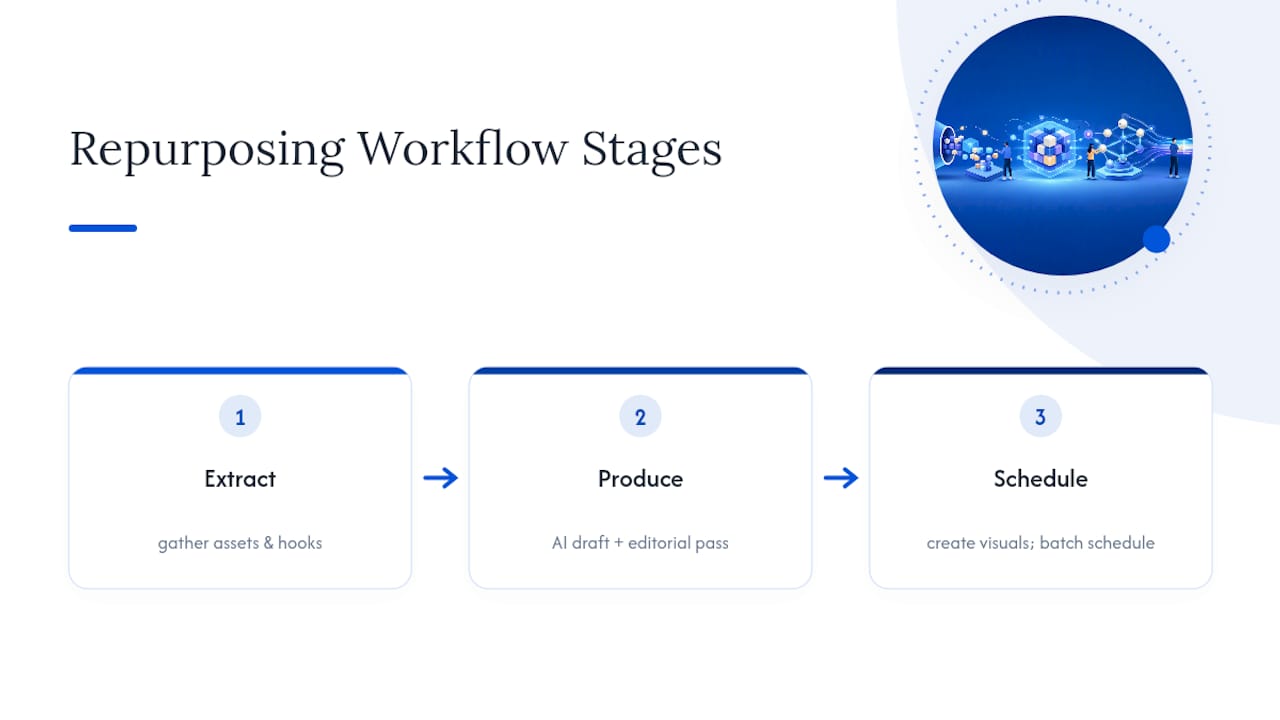
The system that actually gets repurposing off a whiteboard and into production has three stages, and skipping the first one is the most common reason repurposing efforts stall.
Extract. Before anyone drafts a single social post, pull the source content into one working document: every standout stat, every quotable line, every visual asset (chart, screenshot, quote card), and three or four possible hooks per platform. Treat this document as the single source of truth for every derivative asset, according to DreamHost’s repurposing workflow research; it keeps every downstream piece consistent and cuts the back-and-forth of hunting through the original article mid-draft.
Produce. Use an AI tool to generate a first draft for each format from the extraction document, then run it through an editorial pass that adds voice, cuts generic phrasing, and checks facts against the source. Design templates handle the visual layer: a Canva template for carousels, a caption template for LinkedIn, a lower-third template for video clips. The AI draft should never be the published version. It’s a starting point that saves the blank-page problem, nothing more.
Schedule. Batch by phase rather than by asset. Spend one day extracting, one day writing text formats, one day producing visuals, one day scheduling everything, an approach documented in practitioner workflow guides on building a repurposing pipeline. This cuts the mental cost of switching between writing and design work all day.
For a two or three-person marketing team, assign roles clearly: one person owns extraction and editorial review, one owns design and video, one owns scheduling and community replies. Solo operators run all three phases but should still keep them on separate days.
Pro Tip: Keep the extraction document in a shared folder and date it. Six months later, when you’re deciding what to repurpose next, you’ll have a running library of source material instead of starting the extraction step from zero every time.
How Do You Adapt One Idea for Different Platforms?
The core insight stays fixed. The format, length, and hook change completely depending on where it lands.
LinkedIn text post. Keep it under 200 words with a one-line hook and a line-break heavy structure. Pull the single strongest stat or claim from the source piece and build the whole post around it, closing with a question that invites comment rather than a hard CTA.
Instagram or LinkedIn carousel. Break the source content into five to eight slides, one idea per slide. The first slide is the hook, the last slide is the takeaway plus a soft CTA. Carousels work well for anything list-based: steps, criteria, common mistakes.
Short-form video clip. Pull a 30 to 90 second segment from a webinar, podcast, or talking-head recording. Native upload beats link-sharing on every major platform, since algorithms deprioritize posts that send users elsewhere. Open with the payoff, not a setup.
Email snippet. Take one section of the source article and expand it slightly with a personal framing line (“we get asked this constantly”), then link to the full piece for readers who want more depth. Email rewards curiosity plus utility, not a full repost.
Blog refresh. If the source article is aging, update the introduction with current context, add a data point or two, and insert new subheadings that map to actual search questions. This is a refresh, not a new page, and it should never compete with the original URL for the same keyword.
A few distribution rules apply across all five formats. Native uploads consistently outperform link-outs for reach, so reserve link-sharing for email and for blog cross-references. Cadence matters more than volume: one asset per platform per day beats posting five things on LinkedIn and going silent for a week. And every hook needs to be rewritten for the platform’s default reading behavior, fast and skimmable for social, slower and detail-tolerant for email and blog, while the underlying insight never changes. A cross-posting strategy built around this same distribution logic can help you sequence which platform gets which asset first.
What Tools and Templates Do You Actually Need?
Most teams overbuy tools before they’ve even run one repurposing cycle. Five categories cover the entire workflow, and one tool per category is usually enough, based on DreamHost’s practical toolstack breakdown:
- Document extraction: Notion or Google Docs, for the single source-of-truth extraction file.
- AI drafting: ChatGPT or Claude, for first-draft generation per platform.
- Design: Canva, for carousels, quote cards, and social graphics.
- Clipping and video: Descript or Opus Clip, for pulling short-form clips from longer recordings.
- Scheduling: Buffer or Later, for batching and staggering publication across channels.
Templates speed up production even further. A text post template needs a hook line, a supporting stat, two to three body lines, and a closing question. A carousel template needs a title slide, five to eight content slides, and a CTA slide. A video script template needs a three-second hook, the core insight, and a one-line call to action. An email snippet template needs a personal opener, the repurposed insight, and a link back to the full piece.
AI should draft structure and a first pass at phrasing, never the final voice. Editorial review exists to strip generic transitions, verify every stat still matches the source, and rewrite anything that reads like it could belong to any brand. Unedited AI output is the fastest way to make five pieces of content sound like one bland press release.
Pro Tip: Build your templates once, store them in your design tool, and reuse the same structure every cycle. The time you save on layout decisions adds up faster than any single content idea will.
Which Metrics Prove a Repurposing Campaign Is Working?
Track performance at two levels: per format and in aggregate across the whole campaign.
- Per-format KPIs. Short video: views and average watch time. Carousels: saves and shares. Social posts: click-through rate on any linked CTA. Email: open rate and click rate on the repurposed section specifically. Blog refresh: organic traffic change and average position for the target query.
- Aggregate reach. Tag every derivative asset with a shared UTM parameter or a content-family label (the same source ID appended to each link) so analytics tools can group them and report total reach, total clicks, and total conversions attributable to one source piece.
- Scale-or-stop decision. If the aggregate numbers beat your baseline for a single fresh content piece, and the source material still has untapped angles, scale the format that performed best. If nothing outperforms baseline after one full cycle, the source material likely wasn’t strong enough to repurpose in the first place.
A documented extract, produce, schedule workflow can turn one source piece into 15 or more distinct assets over a 30 day window, according to DreamHost’s repurposing workflow data. That number matters less as a target to hit and more as a benchmark, if your first cycle produces six assets instead of fifteen, that’s a sign your extraction step needs more depth, not that repurposing failed. For a deeper breakdown of tracking AI-driven visibility specifically, a framework for measuring AI search visibility covers metrics beyond standard analytics.
Does Repurposing Hurt SEO by Creating Duplicate Content?
Only if you do it carelessly. Google’s spam policies explicitly warn against scaled content abuse, where multiple indexable URLs exist to manipulate rankings rather than serve a genuinely different user need, per Google Search Central’s spam policies. The fix isn’t avoiding repurposing, it’s being deliberate about what becomes a new indexable page and what doesn’t.
Use this decision rule: refresh the original page when the update serves the same search intent as before. Split it into a new page only when a subtopic deserves its own ranking target and its own distinct search query. Transform it into a non-indexable format (a video, a social post, an email) when the value is in the delivery, not a new URL. Never publish two pages targeting the same keyword with only minor rewording, according to BriefIQ’s guidance on avoiding thin or competing pages.
For AI visibility, structure matters as much as uniqueness. LLMs and AI answer engines favor content built from clear sections, named statistics, and numbered or bulleted lists, since that structure is easier to extract and cite accurately. A dense paragraph burying a great stat is far less likely to get quoted by an AI answer engine than the same stat presented as a labeled, standalone data point. Practical steps:
- Break every repurposed long-form piece into scannable sections with descriptive subheadings.
- State statistics as complete sentences with the source named, not buried mid-clause.
- Use short lists for steps, criteria, or comparisons instead of dense prose.
An AI Overviews playbook covering structured summaries goes deeper on formatting content specifically for AI answer extraction.
A 30-Day Calendar: One Source Piece, 15+ Assets
Here’s a schedule you can copy directly. It assumes one long-form source piece, a webinar recording, a research report, or a cornerstone blog post.
Days 1 to 3: extraction and planning. Pull every stat, quote, and standalone idea into the extraction document. Identify three splitting points for social content and one refresh opportunity for the original page.
Days 4 to 7: production batch one. Draft the LinkedIn post, the first carousel, and the email snippet. Send drafts through editorial review.
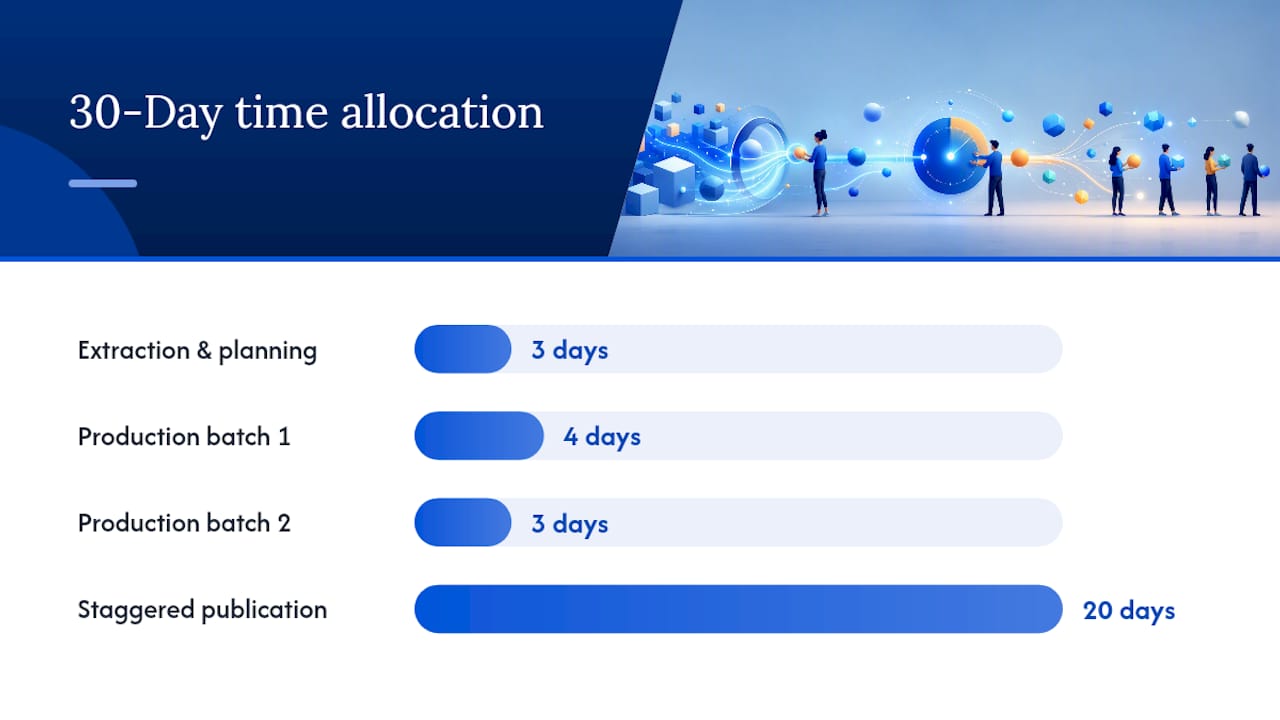
Days 8 to 10: production batch two. Clip two short-form videos from any recorded source material. Design the carousel graphics.
Days 11 to 30: staggered publication.
- Day 11: publish the LinkedIn post.
- Day 13: send the email snippet.
- Day 15: publish the first carousel.
- Day 17: post the first short video clip.
- Day 19: publish the refreshed blog section with updated stats.
- Day 22: post the second short video clip.
- Day 24: publish a second carousel built from a different subtopic in the source.
- Day 27: post a follow-up LinkedIn text piece referencing audience reactions from earlier posts.
- Day 30: review performance and decide what repeats next cycle.
Space assets one per channel per day rather than posting everything at once. Spacing improves what you learn from each format and reduces fatigue among repeat viewers of your feed, a pattern documented in DreamHost’s repurposing research. Batch production by phase (extraction, writing, design, scheduling) rather than jumping between tasks daily.
After day 30, run a short review:
- Which format got the highest engagement relative to effort spent producing it?
- Did the blog refresh move organic rankings within two to three weeks?
- Which asset would you cut first if you had half the time next cycle?
Legal and Copyright Considerations When Repurposing Content
Repurposing your own content rarely raises legal issues, but a few situations need attention before you hit publish. If your source content includes licensed stock photography, purchased music, or a guest contributor’s original writing, check the license terms before reusing that asset in a new format. A stock image licensed for blog use may not cover paid social advertising, and a guest post’s copyright usually stays with its original author unless your contributor agreement says otherwise.
Quotes and statistics from third-party sources need attribution every time they appear, not just in the original piece. If a video clip includes someone else’s voice, likeness, or trademarked material, whether an interview subject, a conference speaker, or background footage, get clear permission before republishing that clip across new channels, especially paid ones.
Repurposing customer testimonials or case study data carries its own risk: confirm the original agreement covers reuse in new formats, particularly video or paid advertising, since many testimonial releases are scoped narrowly to written use on a specific page.
When in doubt about a specific reuse case, a quick check with legal counsel costs far less than a takedown request or a dispute with a former client. None of this should discourage repurposing internally created, wholly owned content, the vast majority of what most content teams produce, but it’s worth a five-minute audit before scaling a workflow that touches licensed media or third-party quotes.
Repurposing Content for Different Audience Segments
The same source insight often needs a different entry point depending on who’s reading it. A single case study, for example, can serve three different buyer personas without changing its underlying facts, only its framing.
For a top-of-funnel audience unfamiliar with your category, repurpose the case study into an educational carousel or short video that explains the problem before mentioning the solution. For a bottom-of-funnel audience actively comparing options, repurpose the same case study into a detailed one-page breakdown with specific numbers, timelines, and outcomes, sent directly in a sales follow-up email.
For existing customers, repurpose it again as a feature-adoption email highlighting a capability they haven’t used yet, framed around the same result but pointed at a different action.
Segmenting by role works the same way. A technical buyer wants implementation detail and specificity. An executive buyer wants the business outcome and the time-to-value. Repurposing lets you serve both from one source without writing two separate case studies from scratch, you’re adjusting depth and framing, not inventing new claims.
The practical move is to map your source content’s insights against your top two or three personas before you start drafting derivatives, then decide which insight maps to which persona and which channel. Skipping this step is how teams end up with five repurposed assets that all target the same generic reader instead of five assets that each convert a specific segment.
Keeping Brand Voice Consistent Across Repurposed Formats
The fastest way to make repurposed content feel disjointed is letting each platform’s default tone override your brand’s voice. A carousel doesn’t need to sound like a press release, but it also shouldn’t sound like it came from a different company than your email newsletter.
Start with a short voice reference, three to five adjectives that describe how your brand sounds (direct, warm, slightly irreverent, data-driven) and a handful of phrases you’d never use. Attach this reference to the extraction document so every writer or AI prompt pulls from the same source, rather than reinventing tone per platform.
Editorial review is where consistency actually gets enforced, not created. AI drafts tend to default toward generic, safe phrasing regardless of what tone instructions you give it, so the editorial pass needs to specifically check for voice drift: does this carousel sound like the same brand that wrote the blog post it came from?
Visual consistency matters just as much as tonal consistency. Using the same color palette, font, and logo placement across every carousel and video clip template means readers recognize your content before they even read the hook, which matters more as you scale volume across platforms.
The one place voice should flex intentionally is CTA phrasing. A LinkedIn post’s closing line can be more conversational than an email’s, and that’s fine, the core voice stays constant even as the specific words adapt to what each platform’s audience expects.
Common Pitfalls in Content Repurposing (and How to Avoid Them)
The biggest failure mode isn’t picking bad source content, it’s skipping the extraction step and jumping straight to drafting each platform’s version from memory. That produces inconsistent messaging and forces you to reread the original article five separate times. Fix it by making the extraction document mandatory before any production work starts.
The second common mistake is chasing every platform at once instead of picking two or three that actually reach your audience. A five-person team trying to maintain a native presence on six platforms simultaneously produces mediocre content everywhere rather than strong content somewhere. Pick the channels where your actual buyers spend time, and repurpose deliberately into those first.
Over-replication is the third trap: publishing near-identical text across platforms with only the character count changed. This wastes the format-specific advantages of each channel and, on the SEO side, risks the scaled content abuse Google’s guidelines call out directly. Each derivative needs its own hook and its own structural logic, not a copy-paste with trimmed sentences.
Finally, teams frequently skip measurement entirely, publishing a full 30-day repurposing cycle and never checking which formats actually performed. Without UTM tagging and a shared content-family label, you can’t tell whether the campaign worked or which asset to repeat. Build the tagging step into day one of the calendar, not as an afterthought after publication.
Systems Beat One-Off Hacks
Most content teams treat repurposing as a checklist item, chop the blog post into five tweets, call it done. That gets diminishing returns fast because it skips the part that actually compounds: a documented, repeatable workflow that gets faster and more accurate every cycle you run it.
The teams that get real leverage from repurposing are the ones treating the extraction document as infrastructure, not a one-time task. Every cycle adds to a growing library of source material, tested hooks, and platform-specific templates. That’s what compounds, not the individual social post.
Avoid the two traps that undo this: over-replicating the same message across channels until it reads like spam, and chasing every new platform instead of mastering two or three. Run one documented 30-day cycle before scaling anything. The data from that single cycle will tell you more than another month of guessing.
— Mike
A Done-for-You Option When You’d Rather Not Run the Pipeline Yourself
If everything above sounds right but your team doesn’t have the hours to build extraction documents, draft five formats, and manage a scheduling calendar every month, that’s a real constraint, not a failure of strategy. A done-for-you service can run this repurposing logic on autopilot for businesses, providing monthly SEO articles published to your site, backlinks through a publisher network, Reddit mentions in relevant conversations, and AI-generated social posts across platforms, all built around the same extract-and-distribute logic covered in this article.

This fits best if you’re a business owner who wants consistent content output without hiring a content team or spending weekends learning design tools, and if your priority is steady visibility growth over hands-on creative control. It’s a poor fit if you need heavy involvement in every caption’s wording. If you’re weighing whether to build this in-house or hand it off, the deciding factor is usually volume: one source piece a month is manageable solo, but sustaining fifteen or more assets consistently is where most teams stall out. Check Mysearchhero’s plans to see which tier matches your current output.
Sources
- Google Search Central — Spam policies
- Content repurposing map for better SEO & LLM visibility — Search Engine Land
- Content Repurposing Workflow: 1 Post to 15+ Assets — DreamHost
- How to repurpose content for SEO without creating thin or competing pages — BriefIQ
FAQ
What Is a Content Repurposing Strategy in One Sentence?
It’s a documented system for extracting the core insights from one piece of content and rebuilding them into multiple platform-specific formats, rather than posting the same content everywhere unchanged.
How Is Repurposing Different From Crossposting?
Crossposting publishes identical content across channels, while repurposing rebuilds the message into a new format built for each platform’s audience and length expectations.
How Many Assets Can One Piece of Content Produce?
A well-executed extract, produce, schedule workflow can generate a number of distinct assets from a single source piece over a 30 day cycle, based on documented repurposing workflows.
Does Repurposing Hurt SEO Rankings?
Not when done correctly. Problems only arise when teams publish near-duplicate indexable pages targeting the same query, which Google’s spam policies flag as scaled content abuse.
What’s the Fastest Way to Start if I Don’t Have Time to Build This Myself?
Running the workflow manually takes real hours each month; a managed service like Mysearchhero handles the article production, distribution, and scheduling automatically for businesses that need consistent output without adding headcount.