
TL;DR:
- An editorial calendar is a crucial operational tool that organizes and tracks content across marketing channels, ensuring consistent publishing. It enhances team collaboration, reveals content gaps, and improves decision-making by providing real-time visibility into workflows and deadlines. To succeed, teams should treat it as a living document, review it weekly, and gradually adopt more sophisticated tools aligned with their growth.
An editorial calendar is a planning tool that organizes, schedules, and tracks content across every channel your business publishes on, from blog posts and social media to podcasts and email newsletters. The role of editorial calendar management goes far beyond picking publish dates. It answers four questions for every piece of content: what gets published, when it goes live, where it appears, and who owns it. For content marketers and small business owners, that level of clarity separates teams that publish consistently from those that scramble every week. Tools like HubSpot and Airtable have made this kind of structured planning accessible to teams of any size.
How does an editorial calendar support content planning and team collaboration?
The most immediate benefit of a marketing editorial calendar is visibility. When every piece of content lives in one shared system, writers, designers, editors, and managers all know exactly where a project stands without sending a single status email.

Editorial calendars support collaboration by acting as a centralized reference that shows who owns each task and when it is due. That single source of truth eliminates the “I thought you were handling that” conversations that stall content pipelines. Teams at companies like Buffer and Zapier have credited shared content planning systems with cutting their internal back-and-forth by a significant margin.
The planning benefits extend beyond daily task management. A well-maintained calendar surfaces content gaps weeks in advance, giving teams time to commission or create pieces before a deadline becomes a crisis. Without that forward visibility, most teams default to reactive publishing, filling gaps with whatever is fastest rather than what is most strategic.
Here is what a well-structured editorial calendar does for your team on a practical level:
- Reduces missed deadlines by making every due date visible to all contributors at once
- Clarifies ownership so no task sits in limbo waiting for someone to claim it
- Surfaces bottlenecks early when a review stage is running behind schedule
- Prevents duplicate effort by showing what content is already planned or in progress
- Supports onboarding by giving new team members an instant overview of how content flows
Pro Tip: Set a recurring 15-minute weekly calendar review meeting. Teams that review their editorial calendar together at the start of each week catch conflicts and gaps before they become problems, not after.
What are the critical components of an effective editorial calendar?
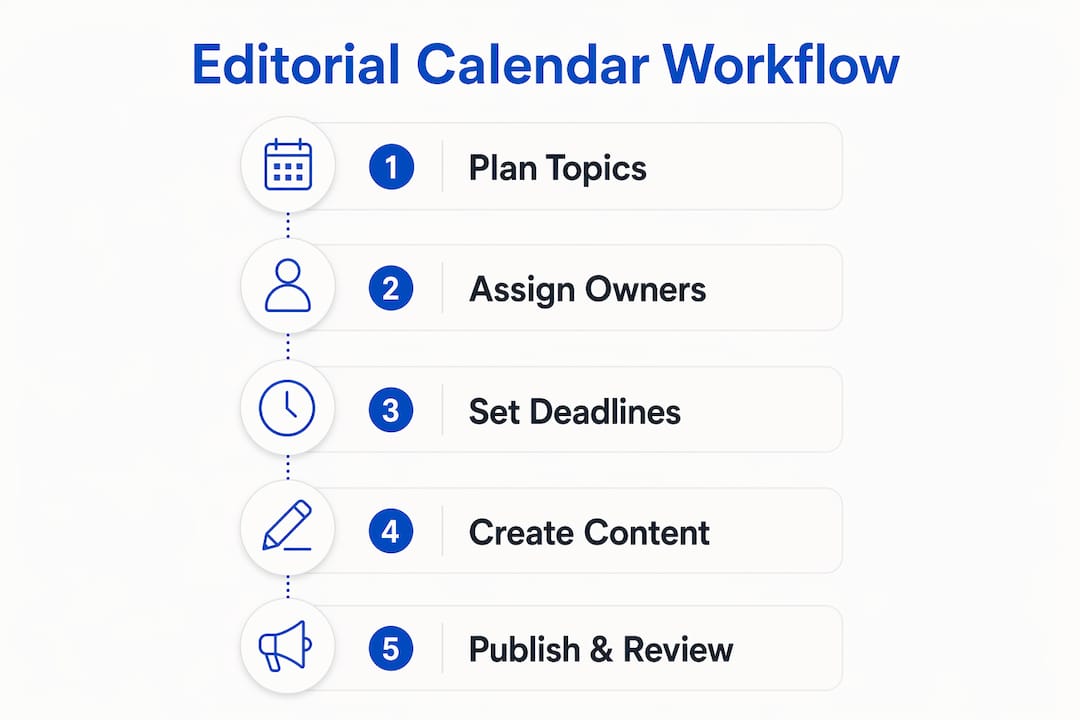
Most editorial calendars fail not because the concept is wrong but because they only track publish dates. Successful calendars model the full content workflow, including draft deadlines, review windows, design handoffs, and final approval dates. Tracking only the end date is like planning a road trip by only writing down your destination.
Every entry in your calendar should include at minimum: the content title or working title, the target publish date, the assigned writer, the assigned editor or reviewer, the design deadline if visuals are needed, the target channel or platform, and the current workflow status. Status fields like “drafting,” “in review,” and “approved” let you spot delays at a glance rather than discovering them the day before publication.
Here is a practical sequence for building your first editorial calendar:
- Choose your tool. A Google Sheets spreadsheet works for solo operators and small teams. Airtable and Notion work better once you need relational data, multiple assignees, or content tied to campaigns. Project management platforms like Asana or Monday.com suit larger teams with complex approval chains.
- Define your workflow stages. Map out every step a piece of content goes through from idea to publication. These stages become your status fields.
- Assign owners to every stage. Not just the writer. Assign a reviewer, a designer if needed, and a final approver.
- Lock the next 7 to 14 days in detail. Small businesses benefit from locking near-term plans with specific dates while keeping longer-horizon plans flexible and high-level.
- Schedule a weekly review. Treat the calendar as a living document. Calendars that evolve with organizational needs through regular stakeholder input stay relevant. Static ones get abandoned.
Pro Tip: Build buffer time into every workflow stage, not just the publish date. If your review stage typically takes two days, schedule three. That one-day buffer prevents a single delay from cascading through your entire pipeline.
Here is a quick comparison of the most common tools for managing an editorial calendar:
| Tool | Best for | Complexity |
|---|---|---|
| Google Sheets | Solo creators and small teams | Low |
| Airtable | Teams needing relational data and filters | Medium |
| Notion | Teams that want docs and calendar in one place | Medium |
| Asana / Monday.com | Larger teams with multi-stage approval workflows | High |
| HubSpot | Marketing teams integrating calendar with CRM | High |
How does an editorial calendar differ from a content strategy?
These three terms get used interchangeably, but they describe different things. Understanding the distinction helps you use each one correctly.
- Content strategy defines the why and who. It sets your audience, your goals, your brand voice, and the topics you will own. Strategy answers: “What do we stand for and who are we trying to reach?”
- Content calendar organizes the what and which topics. It is a broader view of content ideas, themes, and campaigns mapped to time periods. Think of it as your editorial backlog.
- Editorial calendar manages the when, where, and who. It is the operational layer that turns strategy and topic ideas into scheduled, assigned, trackable work.
| Term | Primary focus | Key question it answers |
|---|---|---|
| Content strategy | Goals, audience, messaging | Why are we creating this content? |
| Content calendar | Topics, themes, content ideas | What content will we create? |
| Editorial calendar | Scheduling, ownership, workflow | When, where, and who publishes it? |
The three work together in sequence. Strategy informs your content calendar, and your content calendar feeds your editorial calendar. Skipping the strategy layer means your editorial calendar is organized but directionless. Skipping the editorial calendar means your strategy never makes it to publication on time. You can learn more about how these layers connect in this content calendar guide for marketers.
What measurable benefits can small businesses expect from using an editorial calendar?
Consistency is the most documented benefit. Teams that publish on a predictable schedule build audience trust faster than those that publish in bursts. An editorial calendar makes consistency the default rather than the exception, because the work is planned and assigned before the week starts.
“The true value of an editorial calendar comes from the relationships and listening within the organization, enabling more effective and aligned content planning.” — Ragan Communications
That quote captures something most articles miss. The calendar itself is not the asset. The discipline and communication habits it creates are. When your team reviews the calendar together regularly, they surface strategic misalignments early, before a piece is written and ready to publish.
Editorial calendars improve decision-making by serving as records of published content and tracking performance over time. That historical record is especially valuable for small businesses, where the same person often handles strategy, writing, and distribution. Looking back at six months of published content reveals patterns: which topics drove traffic, which formats underperformed, and where content gaps exist in the funnel.
Shared calendars decrease conflicts and improve team communication by giving everyone a single reference point for deadlines and contacts. For small businesses working with freelancers or contractors, this is particularly valuable. A freelancer who can see the full calendar context produces better work than one receiving isolated briefs with no visibility into the broader plan. The content marketing workflow guide from Mysearchhero covers how to structure this kind of external contributor access effectively.
How to implement an editorial calendar in your marketing workflow
Starting simple is the right call. A one-page Google Sheet with five columns (title, channel, publish date, owner, status) beats an elaborate Airtable setup that no one updates. Complexity should grow in response to real team needs, not in anticipation of them.
The most common reason editorial calendars fail is that they become write-only documents. Someone builds the calendar, populates it for the first month, and then stops updating it. Keeping the calendar visible, current, and central to daily team workflow is what separates a trusted planning tool from an abandoned spreadsheet.
Practical steps for a successful rollout:
- Involve stakeholders from day one. If writers, designers, and managers do not have input into the calendar structure, they will not feel ownership over maintaining it.
- Integrate with your existing tools. HubSpot’s marketing calendar connects directly to its CMS and CRM, so publish dates and campaign data stay in sync. If you use a different stack, Zapier can connect most calendar tools to your publishing platforms automatically. See how marketing automation for SMBs can extend this further.
- Update status fields in real time. A calendar that shows everything as “in progress” for three weeks is not useful. Real-time status updates are what make the calendar a reliable decision-making tool.
- Build in flexibility. Leave at least one open slot per week for reactive content tied to news, trends, or unexpected opportunities.
- Review performance monthly. Use the calendar as a record of what was published and connect it to your analytics to track which content types and topics deliver results.
Pro Tip: Color-code your calendar by content type or channel. A visual scan should tell you instantly whether you are over-indexed on one format or neglecting a key platform.
Key takeaways
An editorial calendar is the operational layer that turns content strategy into consistent, accountable publishing. Without it, even the best strategy stays on a whiteboard.
| Point | Details |
|---|---|
| Define the full workflow | Track draft, review, design, and publish dates, not just the go-live date. |
| Assign owners to every stage | Clear ownership prevents tasks from stalling between contributors. |
| Treat it as a living document | Review and update the calendar weekly to reflect shifting priorities. |
| Match tool complexity to team size | Start with Google Sheets and graduate to Airtable or Notion as needs grow. |
| Connect calendar to performance data | Use published content records to identify what works and refine future planning. |
Why most editorial calendars never reach their potential
I have reviewed content operations for dozens of small businesses and marketing teams, and the pattern is almost always the same. The calendar gets built with real care. Columns are labeled, owners are assigned, and the first month looks great. Then week five arrives, a deadline slips, someone stops updating their status field, and within two months the calendar is a ghost town that everyone ignores.
The problem is not the tool. It is the expectation that the calendar will manage itself once it is set up. The teams I have seen get genuine, lasting value from their editorial calendars treat the weekly review as non-negotiable. Not a long meeting. Fifteen minutes. But it happens every week without exception.
The other shift that changes everything is moving from a flat spreadsheet to a database-driven platform like Notion or Airtable. When your content entries are relational records rather than rows in a sheet, you can filter by funnel stage, content type, or campaign in seconds. That is when the calendar stops being a scheduling tool and starts being a strategic asset. The Editorial Calendar 2.0 concept tracks content ROI, user intent, and funnel stage alongside publish dates. For a small business owner managing content alone, that level of visibility is what separates reactive publishing from genuine content marketing.
My honest advice: do not wait until your operation is big enough to “need” a proper calendar. The discipline you build with a simple five-column spreadsheet today is the same discipline that scales when your team grows. Start now, keep it updated, and review it weekly. That is the whole system.
— Mike
How Mysearchhero takes the calendar work off your plate

Building and maintaining an editorial calendar is one thing. Filling it with published articles, backlinks, and social content every single month is another. Mysearchhero is a done-for-you SEO and content marketing service that handles the entire pipeline for you. Each month, subscribers receive published articles, backlinks, Reddit mentions, and AI-generated social media posts pushed out through a fully automated system. You get a content operation running on autopilot without hiring a team or managing a calendar yourself. If you want to see what consistent, strategic content publishing looks like in practice, Mysearchhero is built exactly for that.
FAQ
What is the role of an editorial calendar in marketing?
An editorial calendar organizes what content gets published, when, where, and by whom across all marketing channels. It gives teams visibility into the content pipeline and keeps contributors accountable to deadlines.
How is an editorial calendar different from a content calendar?
A content calendar organizes topics and content ideas broadly, while an editorial calendar manages the operational details: specific publish dates, assigned owners, workflow stages, and channel assignments.
What should an editorial calendar include?
Every entry should include the content title, publish date, assigned writer and editor, target channel, design deadline if applicable, and a current workflow status field such as drafting, in review, or approved.
What tools work best for an editorial calendar?
Google Sheets works for small teams and solo operators. Airtable and Notion handle more complex needs with relational data. HubSpot suits marketing teams that want calendar integration with their CRM and publishing tools.
How often should you update your editorial calendar?
The calendar should be updated in real time as workflow statuses change, with a formal team review at least once per week to catch gaps, conflicts, and shifting priorities before they become problems.