
TL;DR:
- The best AI tools for service businesses focus on specific jobs like support, automation, and content creation. Running a 30-day pilot on one task helps measure measurable improvements before expanding. Managed SEO services like Mysearchhero provide ongoing growth with minimal setup, freeing owners from content management.
If you want the short answer: the top AI tools for service businesses break down by job, not by hype. For managed SEO and content growth, Mysearchhero is the done-for-you pick. For customer support, Zendesk AI or Intercom Fin. For workflow automation, Zapier or Make. For writing and summarization, ChatGPT or Claude. For scheduling and field visibility, Dialpad AI or Workstatus. Pick one job, pick one tool, and run a 30-day pilot before adding anything else.
- Managed content and SEO growth: Mysearchhero — monthly articles, backlinks, Reddit mentions, and social posts, all handled for you
- Customer support and chat: Zendesk AI, Intercom Fin, or Tidio — depending on your volume and budget
- Workflow automation: Zapier (simple) or Make (complex multi-step flows)
- Writing and summarization: ChatGPT or Claude for drafts; Grammarly or Jasper for polish and marketing copy
- Scheduling, dispatch, and field tracking: Workstatus for crew visibility; Dialpad AI for call intelligence
- Analytics and forecasting: HubSpot AI if you’re already in HubSpot; Power BI with Copilot for Microsoft shops
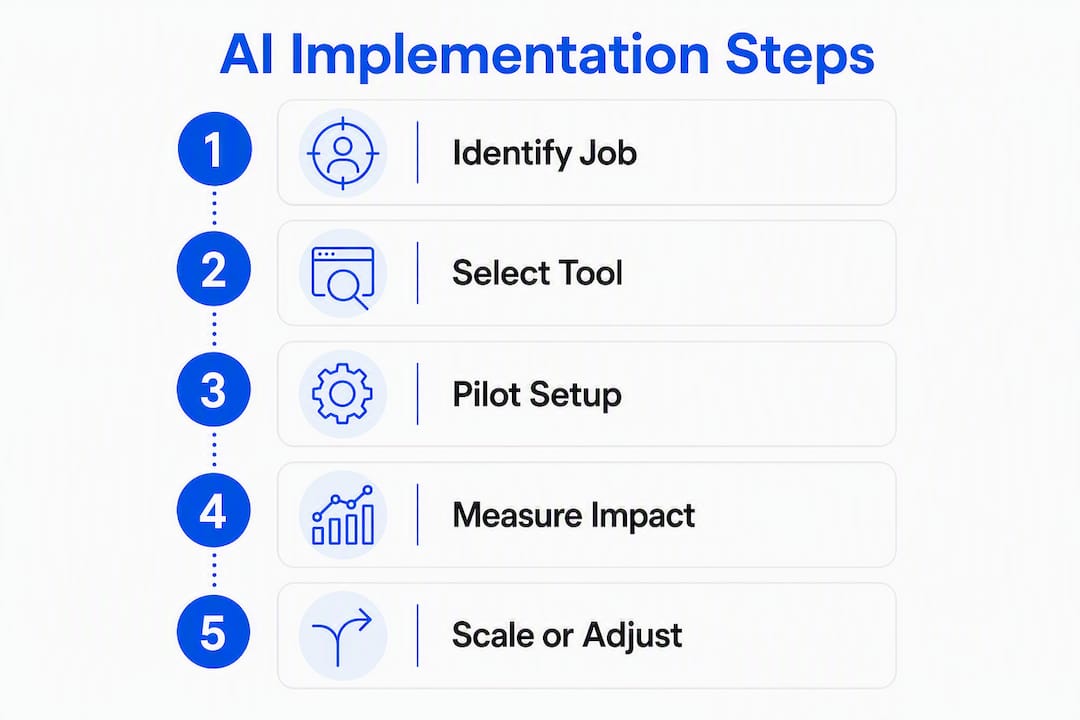
Actionable next step: choose one job from the list above, pick the matching tool, and commit to a 30–60 day pilot with three to five active users before expanding.
Table of Contents
- Why AI helps service businesses and when it delivers the most value
- How to choose the right AI tool for your service business
- Top AI tools for service businesses, organized by use case
- What a recommended 3-tool starter stack looks like
- How these tools were selected
- Quick next steps: pick, pilot, and measure in 30 days
- Key Takeaways
- When done-for-you beats building your own stack
- Mysearchhero handles the content and SEO so you don’t have to
- Useful sources and vendor links
- FAQ
Why AI helps service businesses and when it delivers the most value
The clearest wins for service businesses are not in back-office automation or fancy dashboards. They’re in the moments that cost you money right now: a missed inbound call, a quote that takes three days to send, a customer who books with a competitor because your voicemail didn’t call back.

AI reception and dispatch platforms can answer inbound calls, capture job details, and book from live calendar availability. In documented case notes, same-day call-back rates increased from 60% to 100%, and booked jobs lifted by 20–30% within 60 days. That’s the category to start with if you’re losing leads after hours.
Beyond call answering, the highest-ROI categories for service businesses are:
- Inbound lead capture: AI chat and voice agents that qualify and book leads 24/7 without a receptionist
- After-hours booking: calendar-connected agents that confirm appointments while you sleep
- Quote drafting: writing assistants that turn a few notes into a professional estimate in minutes
- Inbox triage: AI that sorts, labels, and drafts replies to customer emails so your team handles only the exceptions
- Review generation: automated follow-up sequences that ask satisfied customers for a Google review right after job completion
- Dispatch optimization: tools that surface the nearest available technician and reduce drive time
When AI is not worth the investment yet: if your inbound volume is fewer than 20 contacts per week, manual handling is still faster than the setup cost. If your processes aren’t documented, AI will automate the chaos. Fix the workflow first, then automate it.
Statistic to know: According to Marathon Insights, customer communication, document processing, and scheduling are the three categories that deliver the best returns for small businesses, with substantial weekly time savings per department when the right tools are selected.
How to choose the right AI tool for your service business
The biggest mistake owners make is evaluating tools on features instead of fit. A tool with 200 integrations is worthless if it doesn’t connect to your booking calendar. Tekpon’s guidance makes the point plainly: small-business AI success depends more on tool fit and integration than on the underlying model.
Use this seven-item checklist before you sign anything:
- Core outcome: Can you name the single metric this tool will move in 30 days? If not, the use case isn’t clear enough.
- Integration surface: Does it connect to your CRM, calendar, and phone system without a custom build?
- Data portability: Can you export your configurations, conversation history, and outputs in a readable format if you leave?
- Failure-mode clarity: What does the tool do when it’s wrong? Does it escalate to a human, or does it silently fail?
- Total cost of ownership: Add up the subscription, integration maintenance, staff training time, and the hours spent reviewing AI outputs. That’s your real cost.
- Measurable KPIs: Define your baseline before you start. Booked jobs per week, ticket deflection rate, average quote turnaround — pick one.
- Real-user onboarding: Is there a guided setup, or does the vendor hand you a documentation link and disappear?
Questions to ask vendors during demos
- “Show me how it connects to [your CRM name] without engineering work.”
- “What happens when the AI can’t answer a customer question?”
- “Can I export all my data if I cancel?”
- “What triggers a price increase — seats, usage, or contacts?”
- “Does it support Spanish-speaking customers?” (Critical for many US service markets.)
Red flags to walk away from
- No data export option
- No pilot period or money-back window
- Vague SLAs (“we aim for 99% uptime”)
- Sales rep creating urgency around a “limited-time” price
Pilot timeline
| Phase | Timeline | Who’s involved | What to measure | Go/no-go gate |
|---|---|---|---|---|
| Setup and baseline | Days 1–7 | Owner + 1 staff | Current booked jobs, ticket volume, quote turnaround | Baseline captured |
| Active pilot | Days 8–30 | 3–5 users | Booked jobs, deflection rate, time saved | 10%+ improvement on primary KPI |
| Evaluate and decide | Days 31–60 | Owner + team | ROI vs. cost, user satisfaction, integration stability | Expand, iterate, or stop |
Top AI tools for service businesses, organized by use case

The tools below are grouped by the job they do best. Every service business needs at least one from the first two categories. The rest depend on your size and growth stage.
| Tool | Best for | Key features | Ease of setup | Integrations | Pricing model | Scale | Privacy/compliance |
|---|---|---|---|---|---|---|---|
| Mysearchhero | Managed SEO and content growth | Monthly articles, backlinks, Reddit mentions, social posts | Fully managed — no setup | Publisher network, social platforms | Monthly subscription tiers | Solo to small team | Managed by provider |
| Zendesk AI | Enterprise support ticketing | Generative agents, ticket routing, knowledge base | Moderate | Salesforce, Slack, numerous apps | Per-seat, enterprise | Small team to enterprise | SOC 2, GDPR |
| Intercom | Conversational support and lead qualification | Live chat, bots, resolution-based pricing | Moderate | HubSpot, Salesforce, Stripe | Per-seat + resolution fees | Small team to enterprise | GDPR, SOC 2 |
| Intercom Fin | High ticket deflection | Autonomous resolution, human handoff | Low (add-on to Intercom) | Intercom ecosystem | Resolution-based | Small team to enterprise | Inherits Intercom compliance |
| Tidio | Small-site chat and lead capture | Chatbot builder, live chat, email | Low | Shopify, WordPress, Wix | Free tier; paid plans available | Solo to small team | GDPR |
| Dialpad AI | Cloud phone with call intelligence | Transcription, AI summaries, agent assist | Low to moderate | Salesforce, HubSpot, Zendesk | Per-seat subscription | Small team to enterprise | SOC 2, GDPR |
| Drift | Conversational marketing and lead routing | Playbooks, live chat, AI qualification | Moderate | Salesforce, Marketo, HubSpot | Contact vendor | Small team to enterprise | SOC 2 |
| Zapier | Simple app-to-app automation | 7,000+ app connectors, Zap builder | Low | Almost everything | Free tier; paid plans available | Solo to enterprise | SOC 2 |
| Make (Integromat) | Complex multi-step workflows | Visual flow builder, data transformation | Moderate | thousands of apps | Free tier; paid plans available | Solo to enterprise | GDPR, SOC 2 |
| ChatGPT (OpenAI) | Flexible writing and summarization | GPT-4o, plugins, API access | Low | API-based, Zapier | Free tier; Plus at $20/mo | Solo to enterprise | SOC 2 (Enterprise) |
| Claude | Sensitive summarization workflows | Long context, safety-focused responses | Low | API-based | Free tier; Pro at $20/mo | Solo to enterprise | SOC 2 |
| Grammarly | Customer-facing writing quality | Grammar, tone, style guide controls | Low | Browser, Google Docs, Outlook | Free tier; Business plans | Solo to enterprise | SOC 2, GDPR |
| Jasper (Jasper.ai) | Marketing copy and brand voice | Templates, brand voice, campaign tools | Low to moderate | HubSpot, Surfer SEO | Pricing varies by use case | Small team to enterprise | SOC 2 |
| Copy.ai | Quick social and ad copy | Marketing templates, workflow builder | Low | Zapier, HubSpot | Free tier; paid plans | Solo to small team | SOC 2 |
| Notion AI | Internal knowledge and summaries | AI writing, summarization, database | Low | Slack, GitHub, Zapier | Add-on to Notion plans | Solo to enterprise | SOC 2 |
| HubSpot AI | CRM-integrated marketing and support | AI content, predictive scoring, chatbot | Low to moderate | Native CRM ecosystem | Free tier; paid tiers | Solo to enterprise | GDPR, SOC 2 |
| Salesforce Einstein | Predictive lead scoring in Salesforce | Lead scoring, workflow automation, forecasting | High | Native Salesforce | Enterprise pricing | Enterprise | SOC 2, HIPAA options |
| Marketo AI | Campaign personalization at scale | Scoring, personalization, campaign AI | High | Salesforce, Adobe | Enterprise pricing | Enterprise | SOC 2 |
| Microsoft Copilot | Microsoft 365 productivity | Word, Excel, Teams, Outlook AI | Low (if on M365) | Native M365 | From $30/user/mo | Small team to enterprise | SOC 2, HIPAA, GDPR |
| Power BI with Copilot | AI-assisted BI in Microsoft ecosystem | Natural-language queries, report generation | Moderate | M365, Azure, Dynamics | Included in some M365 plans | Small team to enterprise | SOC 2, GDPR |
| ThoughtSpot | Search-driven analytics | Natural-language search, live data queries | Moderate | Snowflake, BigQuery, Redshift | Contact vendor | Small team to enterprise | SOC 2 |
| Tableau GPT | Conversational BI on Tableau | GPT-driven natural-language queries | Moderate | Salesforce, cloud databases | Salesforce/Tableau licensing | Small team to enterprise | SOC 2 |
| DataRobot | Automated ML and forecasting | AutoML, model deployment, monitoring | High | AWS, Azure, GCP | Enterprise pricing | Enterprise | SOC 2, GDPR |
| Alteryx | Low-code data prep and analytics | Data blending, workflow automation | Moderate to high | Salesforce, Snowflake, SAP | Contact vendor | Small team to enterprise | SOC 2 |
| Workstatus | Field crew tracking and timesheets | GPS tracking, time logs, productivity reports | Low | Jira, Asana, Slack | From ~$6/user/mo | Solo to enterprise | GDPR |
| Asana Intelligence | Project planning and risk detection | Timeline AI, risk flags, task automation | Low (if on Asana) | Slack, Google Workspace, Salesforce | Add-on to Asana plans | Small team to enterprise | SOC 2, GDPR |
| UiPath | RPA for back-office automation | Bot builder, document AI, orchestration | High | SAP, Salesforce, M365 | Contact vendor | Enterprise | SOC 2, HIPAA |
| Lindy | Admin task delegation | Scheduling, email replies, coordination | Low | Gmail, Calendar, Slack | Contact vendor | Solo to small team | SOC 2 |
| Spinach AI | Meeting summaries and action items | AI meeting notes, follow-up drafts | Low | Zoom, Google Meet, Slack | Free tier; paid plans | Solo to small team | SOC 2 |
| Clay | Contact enrichment and outreach | Enriched profiles, timeline view, automation | Moderate | HubSpot, Salesforce, LinkedIn | Pricing varies by use case | Small team to enterprise | SOC 2 |
| Intuit Intelligence | Bookkeeping and finance automation | QuickBooks AI, expense categorization | Low (if on QuickBooks) | QuickBooks ecosystem | Included in QuickBooks plans | Solo to small team | SOC 2 |
| Brex AI | Corporate spend analytics | Spend insights, expense automation | Low (if on Brex) | Netsuite, Slack, QuickBooks | Included in Brex plans | Small team to enterprise | SOC 2 |
| Seventh Sense | Email send-time optimization | Engagement-based timing, cadence tools | Low to moderate | HubSpot, Marketo | Contact vendor | Small team to enterprise | GDPR |
| Flick | Social content and hashtag optimization | Hashtag research, content scheduling | Low | Instagram, LinkedIn, TikTok | Pricing varies by use case | Solo to small team | GDPR |
| DALL·E 2 | AI image generation for marketing | Text-to-image, editing, variations | Low | OpenAI API, Zapier | Pay-per-image via API | Solo to enterprise | OpenAI data policy |
| 6sense | B2B account intent and scoring | Intent signals, account-based scoring | High | Salesforce, HubSpot, Marketo | Enterprise pricing | Enterprise | SOC 2 |
| Clari | Revenue forecasting and pipeline | AI forecasting, pipeline hygiene | Moderate to high | Salesforce, Gong, HubSpot | Enterprise pricing | Enterprise | SOC 2 |
| Speechify | Text-to-speech and audio repurposing | TTS, multiple voices, speed control | Low | Web, iOS, Android | Free tier; Premium plans available | Solo to small team | Standard data policy |
| Reply.io | Email outreach and sequence automation | Sequence builder, reply tracking, AI messaging | Moderate | HubSpot, Salesforce, LinkedIn | From ~$60/mo | Small team to enterprise | GDPR, SOC 2 |
A note on tool groupings
Customer service and chat agents (Zendesk AI, Intercom, Intercom Fin, Tidio, Drift) are the highest-priority category for most service businesses. Intercom Fin is worth calling out separately: it’s an autonomous agent layered on top of Intercom that resolves common inquiries without human involvement, then hands off cleanly when it can’t. Enterprise-grade AI agents can autonomously resolve a significant share of support requests when trained on a solid knowledge base and connected to the right channels. The key is defining the handoff rules before you go live.
Automation connectors (Zapier, Make) are the glue layer. Marathon Insights notes that Zapier and similar connectors are often the integration layer that makes pilots feasible fast, especially for SMBs bridging legacy systems and newer AI services. Zapier is the easier starting point; Make gives you more control over complex data flows.
Analytics and BI tools (ThoughtSpot, Tableau GPT, Power BI with Copilot, DataRobot, Alteryx, Clari) are mostly enterprise plays. For a service business under 50 employees, HubSpot AI’s built-in reporting or a simple Power BI dashboard covers most needs. DataRobot and Alteryx are worth evaluating only when you have a data team to run them.
Specialist tools worth noting: Workstatus is the clearest pick for field service teams that need GPS-based crew tracking and automated timesheets. Dialpad AI stands out for any business where phone calls are the primary customer touchpoint — its live transcription and post-call AI summaries reduce the time managers spend reviewing calls by a meaningful margin. Seventh Sense is a narrow but effective tool for businesses running HubSpot or Marketo email campaigns; it optimizes send time per contact based on individual engagement history, which tends to lift open rates without any copy changes.
Tool profiles by use case
Customer service and chat
Zendesk AI is the enterprise standard for support ticketing. If your team already lives in Zendesk, the generative agent features and knowledge-base integration are worth activating before you evaluate any standalone chatbot. The setup is moderate, but the workflow depth is hard to match.
Tidio is the opposite end of the spectrum. It takes under an hour to install on a WordPress or Shopify site, and the free tier handles basic lead capture and FAQ responses. For a solo operator or a small team without a dedicated support function, it’s the fastest way to stop losing leads after hours.
Automation and connectors
Zapier’s 7,000-plus app library means it connects to almost every tool a service business uses. The free tier covers simple two-step automations. If you need conditional logic, multi-branch flows, or data transformation between steps, Make handles that more cleanly. Both tools are the practical answer to “how do I connect my booking system to my CRM without hiring a developer?”
Writing and content
ChatGPT and Claude handle the heavy lifting: drafting estimates, summarizing call notes, writing follow-up emails, and generating first-draft blog posts. Grammarly then catches tone and grammar issues before anything goes to a customer. Jasper adds marketing-specific templates and brand voice controls for teams producing high volumes of campaign copy. Copy.ai is a lighter, cheaper option for quick social and ad copy.
CRM and sales intelligence
HubSpot AI is the most accessible entry point for service businesses that don’t yet have a CRM. The free tier is genuinely useful, and the AI features for email drafting, lead scoring, and chatbot setup are built in. Salesforce Einstein and Marketo AI are powerful, but both require existing Salesforce or Adobe infrastructure and a team to configure them. Clay is worth a look for businesses doing outbound outreach at scale — its contact enrichment and timeline view reduce the manual research that kills outreach productivity.
Finance and operations
Intuit Intelligence inside QuickBooks handles expense categorization and basic bookkeeping automation for most small service businesses. Brex AI adds spend analytics for teams using Brex corporate cards. UiPath is the choice when you have genuinely repetitive back-office processes (invoice processing, compliance checks) that need to run at scale without human intervention.
What a recommended 3-tool starter stack looks like
The research consistently points to the same pattern: start with three focused tools rather than an all-in-one platform. Focused tools are easier to swap when your needs change, and they avoid the feature overlap that makes all-in-one platforms feel bloated after six months.
Two paths work for most service businesses:
Path A: DIY 3-tool stack
| Role | Tool | Example task | Expected first-month outcome | Who to involve |
|---|---|---|---|---|
| Writing and summarization | ChatGPT or Claude | Draft quotes, summarize call notes, write follow-up emails | 30–50% reduction in quote turnaround time | Owner or admin |
| Workflow automation | Zapier or Make | Connect booking form to CRM, trigger review request after job close | Automated lead routing, zero manual data entry | Owner or tech-savvy staff |
| CRM and support | HubSpot AI or Zendesk AI | Manage contacts, triage inbound tickets, track deal pipeline | Faster response times, no leads falling through cracks | Owner and front-line staff |
Path B: Done-for-you (Mysearchhero)
For owners who want content, SEO, and customer acquisition handled without building a stack, Mysearchhero delivers monthly articles, backlinks, Reddit mentions, and social posts through a managed pipeline. No tool configuration, no integration maintenance, no staff training. The tradeoff is less direct control over individual outputs, but the time savings are significant for businesses where the owner is also the operator.
Common pitfalls and how to avoid them
- Integration gaps: Assume nothing connects automatically. Map your current tools before you choose a new one, and test the integration in a sandbox before going live.
- Training time underestimated: Budget at least two to four hours per staff member for initial onboarding, plus ongoing time for prompt refinement.
- Data lock-in: Before you commit, confirm you can export all configurations and conversation history. Vendors who resist this question are a red flag.
- Scope creep: Pilots that start with one use case and expand to five before the first 30 days are up rarely produce clean data. One job, one tool, one metric.
Pro Tip: Scope your pilot to a single high-frequency task — inbound call answering or automated quote drafts are the fastest wins for most service businesses. Measure one metric for 30 days before adding a second tool. This keeps the signal clean and makes the go/no-go decision obvious.
How these tools were selected
Every tool on this list was evaluated against six criteria:
- Use-case fit: Does it solve a problem that service businesses actually face — not a generic business problem?
- Integration surface: Does it connect to common service-business tools (booking calendars, CRMs, phone systems, POS) without custom engineering?
- Setup time: Can a non-technical owner or admin configure it in a day or less?
- Data portability: Can you export your data and configurations if you leave?
- Pricing transparency: Is the starting price or free tier publicly listed, or does it require a sales call to get a number?
- Evidence of ROI: Is there documented evidence of measurable outcomes — booked jobs, ticket deflection, time saved?
Primary sources used include product documentation, service-business case pages, and analyst guidance from Marathon Insights and Tekpon. Pilot signals were evaluated based on published case notes and vendor-documented outcomes. Pricing was verified against public pricing pages where available; enterprise-only tools are noted as “contact vendor.”
One important limit: public pricing changes frequently. Always confirm current rates directly with the vendor before purchasing, especially for enterprise tiers.
Selection note: Tekpon’s evaluation framework reinforces the core principle here — integration fit with your existing CRM and calendar often determines success more than the AI model powering the tool. That principle shaped every pick on this list.
Quick next steps: pick, pilot, and measure in 30 days
The 30-day pilot is the most important thing you can do after reading this. Not a purchase, not a full rollout — a contained test with a defined outcome.
- Choose one job from the shortlist at the top of this article. Inbound call answering and automated quote drafts produce the fastest, most measurable results for most service businesses.
- Pick one tool that matches that job. Don’t evaluate three tools simultaneously — you won’t know which one moved the needle.
- Capture your baseline in the first week. Write down your current booked jobs per week, average quote turnaround, or ticket volume. You need a number to compare against.
- Configure one to two integrations only. Connect the tool to your calendar or CRM. Stop there for the first 30 days.
- Train three to five users. Include at least one front-line staff member who will use it daily, not just the owner.
- Measure weekly. Check your primary KPI every Friday. If it’s moving in the right direction by day 30, expand. If it’s flat, diagnose before adding more tools.
Pilot evaluation questions
- Did booked jobs per week increase by at least 10%?
- Did average quote turnaround drop by at least one business day?
- Did ticket deflection rate improve without a spike in escalations?
- Did staff find the tool easier to use after two weeks, or harder?
- What did the tool do wrong, and how did it handle the failure?
Fast wins to prioritize
- Inbound call answering: An AI that answers after hours and books from your calendar can recover leads you’re currently losing to voicemail. This is the highest-ROI starting point for most home and field service businesses.
- Automated quote drafts: A writing assistant that turns job notes into a professional estimate cuts turnaround from days to hours and signals professionalism to the customer.
- Review request automation: A Zapier workflow that sends a review request via SMS 24 hours after job close is a 30-minute setup with compounding returns on your Google Business Profile ranking.
Key Takeaways
The most effective AI strategy for a service business is a focused, job-specific stack of three tools — or a managed done-for-you path — piloted for 30 days against a single measurable outcome before any expansion.
| Point | Details |
|---|---|
| Start with one job | Pick the highest-cost problem first: missed calls, slow quotes, or inbox overload. |
| Integration fit beats model quality | A tool that connects to your CRM and calendar outperforms a fancier one that doesn’t. |
| Pilot before you commit | Run 3–5 users for 30 days, measure one KPI, and make a go/no-go decision on real data. |
| Booked jobs can lift substantially | AI call answering and booking tools have documented lifts of 20–30% in booked jobs within 60 days. |
| Mysearchhero for managed growth | For content, SEO, and customer acquisition without building a stack, Mysearchhero delivers monthly managed deliverables on autopilot. |
When done-for-you beats building your own stack
Most articles about AI tools for service businesses assume you want to build something. Pick a tool, configure it, train your team, monitor the outputs, and iterate. That’s a real path, and for the right owner, it works.
But there’s a version of this that most service business owners don’t talk about honestly: the stack you build in January is often half-abandoned by March. Not because the tools are bad, but because the owner is also the estimator, the scheduler, the quality checker, and the person answering the phone. Adding “AI tool manager” to that list is a harder ask than the vendor demos suggest.
The case for a managed path isn’t that DIY is wrong. It’s that the total cost of ownership for a DIY stack — training time, integration maintenance, prompt refinement, output review — is consistently underestimated. A three-tool stack that takes four hours a week to manage is not free, even if the software subscriptions are cheap.
Where the DIY stack genuinely wins: when you have a tech-comfortable team member who owns the tools, when your processes are already documented, and when you want granular control over every output. In those conditions, Zapier plus ChatGPT plus HubSpot AI is a powerful, affordable combination.
Where the managed path wins: when your time is the constraint, when you want content and SEO handled without thinking about it, and when the goal is customer acquisition rather than internal automation. That’s the gap Mysearchhero fills — not as a replacement for operational tools, but as the content and visibility layer that runs in the background while you run the business.
Mysearchhero handles the content and SEO so you don’t have to
Building a DIY AI stack for operations makes sense for many service businesses. But customer acquisition — getting found on Google, staying visible in local search, publishing content that builds authority — is a different job, and it’s one that most owners deprioritize the moment a busy season hits.

Mysearchhero is built for exactly that gap. Every month, subscribers get a bundle of published SEO articles, authority backlinks from a publisher network, Reddit brand mentions in relevant conversations, and AI-generated social posts — all pushed out through a managed pipeline. No tool configuration, no editorial calendar to maintain, no wondering whether last month’s content actually went live.
For a service business that wants to grow its online presence without adding another tool to manage, it’s a direct alternative to hiring a content agency or building an in-house content operation. The deliverables are consistent, the execution is handled, and the results compound over time as your site builds authority.
Start your Mysearchhero subscription and get your first month of managed SEO and content delivered on autopilot.
Useful sources and vendor links
- Tycoon for Service Businesses: Local and Home Services — documented booking lift data and AI call-answering case notes
- How to Choose the Right AI Tools for Your Small Business — Marathon Insights — category-focused selection guidance and time-savings evidence
- How to Choose AI Tools for Your Business in 2026 — Tekpon — integration-first evaluation rubric for small businesses
- The 10 Best AI Agents for Customer Support in 2026 — Botpress — enterprise agent capabilities and handoff design
- Bazas AI — AI Operations Platform for Service Businesses — provider-agnostic front-desk AI with voice, SMS, and calendar integration
- Cajoon — All-in-One AI Platform to Run Your Small Business — all-in-one platform example for comparison with focused stacks
- Microsoft Copilot pricing — current per-user pricing for Microsoft 365 Copilot
- Mysearchhero — done-for-you SEO and content marketing for service businesses
- The role of AI in content: small business guide — Mysearchhero blog — content workflow guidance and human editing best practices
- Uses of AI in SMEs: boost efficiency with smart tools 2026 — AI Management Agency — practical SME AI adoption examples and efficiency case studies
- AI Search Visibility for Marketers and SEOs: 2026 Guide — SemDash — AI’s role in search visibility and SEO strategy
FAQ
What are the best AI tools for a service-based business?
The highest-impact tools for service businesses are AI chat and call agents for lead capture (Zendesk AI, Intercom Fin, Tidio), workflow automation connectors (Zapier, Make), and writing assistants for quotes and follow-ups (ChatGPT, Claude). For managed SEO and content growth, Mysearchhero delivers monthly deliverables without requiring any tool configuration.
What are the top AI tools for business right now?
ChatGPT, Microsoft Copilot, HubSpot AI, Zapier, and Grammarly consistently rank as the most widely adopted AI tools across business functions. For service businesses specifically, Zendesk AI and Dialpad AI add call intelligence and support automation that general-purpose tools don’t cover.
What are the top five AI tools to know in 2026?
ChatGPT for flexible writing and summarization, Zapier for workflow automation, HubSpot AI for CRM-integrated marketing and support, Grammarly for customer-facing communications, and Dialpad AI for cloud phone with live call intelligence — these five cover the core jobs most service businesses need to automate first.
What is the best AI tool for customer service?
Zendesk AI is the strongest choice for teams with high ticket volume and existing Zendesk infrastructure. Intercom Fin is the best autonomous resolution agent for businesses that want high deflection rates with clean human handoff. Tidio is the fastest to deploy for small service sites that need basic chat and lead capture without a dedicated support team.
How long does it take to see results from an AI tool pilot?
Most service businesses see measurable results within 30–60 days when the pilot is scoped to a single job and a single KPI. AI call-answering tools have documented booked-job lifts of 20–30% within 60 days as same-day callback rates improve from 60% to 100%.