
A content audit is a seven-step process: set goals and scope, build your content inventory, collect performance data, evaluate and score using a rubric, prioritize actions and assign owners, implement changes with governance and a rollback plan, and then measure results and set a recurring audit cadence. Here is the complete checklist you can copy into your project plan right now:
Each step builds on the last. Skip step two and your scoring is guesswork. Skip step five and your team spends weeks on low-value fixes while high-traffic pages bleed conversions. The sections below walk through every step with the exact columns, tools, and decision thresholds you need.
Table of Contents
- What are the core content audit steps you need to follow?
- What about PDFs, videos, and other content types auditors miss?
- Key Takeaways
- The part most audit guides skip over
- Mysearchhero handles the audit work so you can focus on the results
- Useful sources and further reading
- FAQ
What are the core content audit steps you need to follow?
Step 1: Set goals, scope, stakeholders, and success criteria
Before you touch a spreadsheet, decide what a successful audit looks like. The most common goal types are traffic recovery, conversion improvement, UX simplification, AI visibility (getting cited by LLMs like ChatGPT or Perplexity), and content consolidation to reduce keyword cannibalization. Each goal maps to different success metrics, so pick yours first.
Common goal-to-metric pairings:
- Traffic recovery → organic sessions, impressions, average position
- Conversion improvement → goal completions, assisted conversions, revenue per page
- UX simplification → engaged sessions, time on page, exit rate
- AI visibility → LLM referral traffic, AI citation mentions (track in GA4 as a source)
- Content consolidation → number of cannibalizing URL clusters resolved
Scope decisions matter just as much. A full-site audit on a very large site can be a months-long project. A blog-only audit on a smaller content set can be done in a week. Define your scope as one of: full site, specific section (blog, support docs, product pages), or content type (PDFs, videos, landing pages). Document it before anyone starts pulling data.
Stakeholders to assign at kickoff:
- Content owner (writes, edits, approves copy changes)
- SEO owner (handles redirects, canonicals, metadata)
- Developer (template changes, structured data, page speed)
- Legal or compliance (regulated content, disclaimers)
Governance decisions to lock in early: who can approve a deletion, who signs off on a redirect, and what the change window is for production deployments. Without these, audits stall at implementation.
Pro Tip: Limit your initial tracking to 4–6 high-impact metrics. Tracking 20 dimensions per page sounds thorough, but it produces spreadsheet paralysis. Start with organic sessions, conversions, backlinks, freshness, metadata completeness, and business alignment. You can always add dimensions later.
Step 2: How do you build a complete content inventory?
The inventory is the foundation. Get it wrong and every score downstream is unreliable. Reconciling at least three sources is the standard: a rendered site crawl (one that executes JavaScript), a CMS export, and your sitemap or Google Search Console coverage report. Each source catches what the others miss. CMS exports miss orphaned pages. Sitemaps omit noindexed assets. Crawlers miss pages behind authentication or dynamically generated without server-side rendering.
Recommended inventory columns:
| Column | What to capture |
|---|---|
| Canonical URL | Final, normalized URL (strip trailing slashes, lowercase) |
| Content type | Blog post, landing page, support doc, PDF, video, tool |
| Template | Which CMS template or page builder renders it |
| Owner | Person responsible for this page |
| Publish date | Original publication date |
| Last substantive update | Date of last meaningful content change (not CSS fix) |
| Topic cluster | Primary cluster or pillar this page belongs to |
| Funnel stage | Awareness / Consideration / Decision |
| Index status | Indexed, noindexed, canonicalized to another URL |
| Referring domains | Count of unique external domains linking to this URL |
| Notes | Flags: duplicate, thin, outdated, redirect candidate |
Common inventory pitfalls to avoid:
Tools for building the inventory: Screaming Frog SEO Spider for the rendered crawl, your CMS’s native export (WordPress, HubSpot, Contentful all have CSV exports), and the URL Inspection bulk export from Google Search Console. Combine all three in a single Excel or Google Sheets file, normalize URLs before joining (lowercase, consistent trailing slash), and deduplicate on canonical URL.
Step 3: What performance and technical data should you collect?
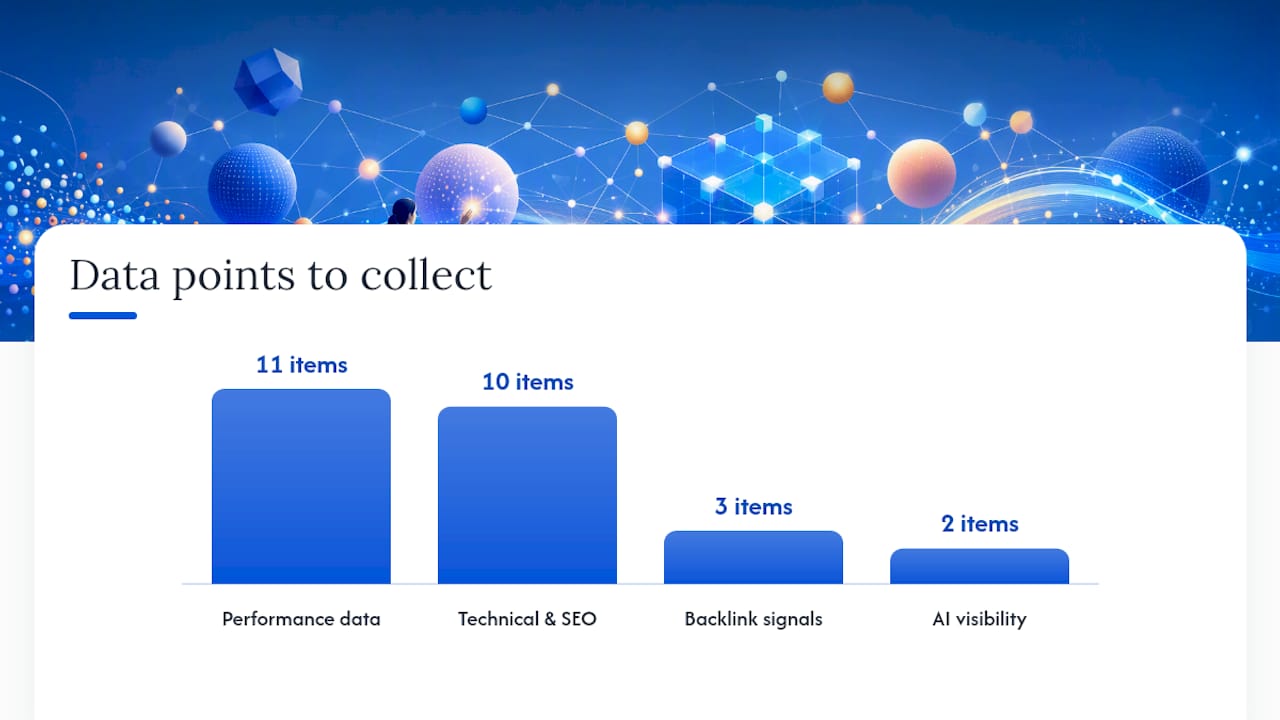
Once the inventory exists, every row needs data attached to it. Combining GA4 and Search Console data before mapping to any action is the right sequence: impressions, clicks, and engaged sessions each reveal different signals, and relying on any single metric alone routinely misleads prioritization.
Performance data to pull:
- Organic sessions (GA4, last 12 months)
- Impressions, clicks, and average position (Google Search Console)
- Conversions and goal completions (GA4 conversion events)
- Engaged sessions and engagement rate (GA4)
- Average engagement time per session
- Exit rate and scroll depth where available
Technical and SEO data to collect:
- Index coverage status (GSC Coverage report)
- Canonical tag (self-referencing or pointing elsewhere)
- Meta title and description (present, length, keyword relevance)
- H1 presence and uniqueness
- Structured data (schema type, validation errors)
- HTTP status codes and redirect chains
- Core Web Vitals basics (LCP, CLS from GSC or PageSpeed Insights)
Backlink and authority signals:
- Referring domains count per URL (Ahrefs or SEMrush)
- Anchor text diversity
- Internal link count (Screaming Frog inlinks report)
AI and LLM visibility metrics (include when available): GA4 source/medium for LLM referral traffic, AI citation mentions tracked via brand monitoring. Top audit guides now include AI visibility metrics as a standard column, and for good reason: a page with zero organic traffic but frequent AI citations is worth keeping.
Tools for this step:
- Google Analytics 4 — sessions, conversions, engagement metrics
- Google Search Console — impressions, clicks, queries, index coverage
- Screaming Frog — technical SEO data, status codes, canonicals, metadata
- Ahrefs or SEMrush — referring domains, keyword rankings, backlink profiles
Note on backlink context: Tying traffic to action decisions without checking backlink and internal link structure often leads teams to delete pages that quietly support domain authority or funnel flow. Always check referring domains before marking a page for deletion.
Step 5: How do you prioritize actions and build the project plan?
Scores tell you what needs work. The impact × effort matrix tells you what to do first. Estimate business impact (traffic potential, conversion lift, brand risk) on a 1–3 scale, and estimate effort in hours. Multiply them, then sort descending.
Sample prioritization matrix:
| URL | Action | Impact (1–3) | Effort (hrs) | Priority score | Owner | Target date |
|---|---|---|---|---|---|---|
| /blog/email-tips | Update | 3 | 4 | — | Content team | Week 2 |
| /services/old-pricing | Delete + 301 | 2 | 1 | — | SEO owner | Week 1 |
| /blog/seo-basics | Consolidate | 3 | 8 | — | Content + Dev | Week 4 |
| /about/team | Delete + 410 | 1 | — | — | SEO owner | Week 1 |
| /resources/guide.pdf | Extract to HTML | 2 | 6 | — | Dev + Content | Week 5 |
Priority score = Impact ÷ Effort. Higher = do first.
Triage labels that keep the backlog clear:
- Prune — low impact, low effort (delete thin pages with no backlinks)
Pro Tip: Schedule your quick wins in the first two weeks. Fixing metadata, cleaning up canonical issues, and removing obvious dead weight takes a short time and produces visible GSC improvements within weeks. That momentum keeps stakeholders engaged while the bigger consolidations move through editorial review.
Step 6: How do you implement changes and enforce governance?
Implementation without governance is how audits create new problems. A page gets deleted without a redirect, a backlink goes dead, and a referring site’s traffic drops. Build the governance layer before anyone touches production.
Implementation checklist:
- Editorial edits: update copy, refresh statistics, fix factual errors, add internal links
- Metadata updates: rewrite title tags (50–60 characters), meta descriptions (150–160 characters), and H1s
- Redirect decisions: use 301 for permanent moves where backlinks exist; use 410 for pages with no backlinks and no redirect target
- Canonical fixes: set self-referencing canonicals on all kept pages; update canonicals on consolidated pages to point to the winner URL
- Structured data: update or add schema (Article, FAQ, HowTo) on refreshed pages; remove schema from deleted pages
- Accessibility adjustments: fix alt text, heading hierarchy, color contrast issues flagged in the audit. Automated tools like Siteimprove can surface these at scale
- Content calendar: add refreshed and new pages to the editorial calendar so publication dates are tracked
Governance template for each change:
- Owner: who executes the change
- Approval step: who signs off before production deployment
- Staging check: confirm redirect resolves, canonical is correct, page renders without errors
- Rollback plan: how to revert if rankings drop unexpectedly (keep a snapshot of the original page)
- Audit sheet update: mark the row as “Implemented” with date and outcome notes
For template-level changes (global header, footer, schema), coordinate with engineering and schedule in a maintenance window. For regulated content (legal disclaimers, financial terms, health claims), loop in legal before any copy changes go live. Accessibility guidelines from the University of Oregon provide a useful reference for what constitutes a compliant fix versus a cosmetic one.
Step 7: How do you measure results and set a recurring cadence?
Implementation is not the finish line. The audit produces a baseline; measurement tells you whether the changes worked.
Short-term KPIs to track (weeks 1–8 post-implementation):
- Impressions and clicks in GSC (look for upward trend on refreshed URLs)
- Average position changes on target queries
- Crawl coverage: confirm deleted pages return 404/410, redirects resolve correctly
- Backlink retention: verify referring domains still resolve to the correct destination
Medium-term KPIs (months 2–6):
- Organic sessions on refreshed pages versus pre-audit baseline
- Conversion rate on updated landing pages
- Engaged session rate and average engagement time
- Rankings for consolidated pages (the winner URL should absorb the merged page’s authority)
Recommended audit cadence:
- Monthly: automated crawl delta to catch new broken links, new noindex tags, or redirect chains
- Quarterly: review the top 20 pages by traffic and conversion for freshness and accuracy
- Every 12–18 months: full deep audit across all content types
- Triggered audits: any site migration, CMS change, major redesign, or domain consolidation
Monitoring checklist to automate:
- Set up GSC email alerts for coverage errors and manual actions
- Schedule a monthly Screaming Frog crawl and compare to the previous month’s export
- Use GA4 custom reports to flag pages where organic sessions drop more than 20% month over month
- Track AI referral traffic as a separate source/medium segment in GA4
What about PDFs, videos, and other content types auditors miss?
Non-HTML assets are the most common blind spot in a content assessment process. PDFs, embedded videos, calculators, interactive tools, support articles behind a login, and archived newsletters rarely appear in a standard crawl report, yet they can carry significant backlink value or serve critical user tasks.
Asset types to scope explicitly:
- Embedded videos: Confirm VideoObject schema is present, check that transcripts exist (both for accessibility and for LLM indexability), and review whether the video content supports a conversion goal
Pro Tip: Before pruning any low-traffic page, check its referring domains and internal link count in Screaming Frog. A page with 8 external backlinks and zero organic traffic is still an authority asset. Delete it without a redirect and you lose that link equity permanently.
Structural role matters as much as traffic. A page that sits at the top of a conversion funnel, resolves a key support question, or holds backlinks from authoritative domains earns its place even when GA4 shows minimal sessions.
Key Takeaways
A content audit produces its highest value when you limit metrics to 4–6 dimensions, reconcile inventory from at least three sources, and assign a named owner to every action before implementation begins.
| Point | Details |
|---|---|
| Fix metadata first | Title, description, and H1 fixes are low effort and produce GSC improvements within 4–6 weeks. |
| Consolidate cannibalizing pages | Merging competing URLs into one winner page concentrates authority and resolves keyword overlap. |
| Check backlinks before deleting | A page with referring domains needs a 301 redirect even if organic traffic is near zero. |
| Limit your metrics | Track 4–6 high-impact dimensions per page to avoid analysis paralysis and keep decisions moving. |
| Mysearchhero for managed execution | Mysearchhero handles crawl, scoring, prioritization, and implementation for small service businesses on autopilot. |
The part most audit guides skip over
Most content audit guides treat the spreadsheet as the deliverable. They show you how to build it, what columns to add, and how to color-code your action buckets. Then they stop. The spreadsheet is not the deliverable. The prioritized action list with named owners and deadlines is.
The single most common reason audits fail is not bad data. It is that the audit produces a 2,000-row spreadsheet that nobody owns. Six weeks later, the content manager is still on row 47 and the SEO lead has moved on to a different project. The spreadsheet becomes a monument to good intentions.
Successful teams do three things differently. They define the minimal viable metric set before the crawl starts, not after. They assign owners at kickoff, not at the end of scoring. And they schedule a weekly 30-minute backlog standup to move rows from “In progress” to “Done” rather than letting the tracker go stale.
The other underrated move: require a rollback plan for every significant change before it goes to production. Not because changes usually go wrong, but because the discipline of writing a rollback plan forces the person making the change to think through what “wrong” would look like. That thinking catches half the mistakes before they happen.
One more thing worth saying plainly: do not prune aggressively on your first audit. The instinct to delete everything under 100 sessions is understandable, but a page with 40 monthly sessions and 6 referring domains from industry publications is doing quiet work for your domain authority. Traffic is one signal. It is not the only one.
Mysearchhero handles the audit work so you can focus on the results
Running a full content audit takes real time: crawling, exporting, joining data sources, scoring hundreds of rows, building the prioritization matrix, coordinating with developers on redirects. For a small service business, that is often a month of part-time work before a single page gets improved.

Mysearchhero’s done-for-you service covers the entire process: full site crawl and inventory reconciliation, performance data collection, rubric scoring, and a prioritized action plan delivered to you. From there, the implementation runs through an automated pipeline that publishes refreshed articles, builds authority backlinks, and keeps your content calendar moving without you managing every step. Clients get measurable traffic and conversion lift without the spreadsheet marathon.
If you are a local or service-based business that wants faster results without hiring an agency or managing a freelance team, see what Mysearchhero delivers and book a discovery call to walk through your site’s current state.
Useful sources and further reading
These references back the frameworks and tool recommendations throughout this guide:
- How to Conduct a Content Audit | YaleSites
- Microsoft Excel
- usability.yale.edu web accessibility: siteimprove
- digitalaccessibility.uoregon.edu/guidelines
FAQ
What are the seven content audit steps?
The seven content audit steps are: set goals and scope, build a content inventory, collect performance data, evaluate and score with a rubric, prioritize by impact and effort, implement changes with governance, then measure results and set a recurring audit cadence.
How often should you run a full content audit?
A deep audit every 12–18 months covers most sites, with monthly automated crawl checks and quarterly reviews of your top 20 pages by traffic and conversion.
Which tools do you need for a content audit?
Google Analytics 4 and Google Search Console handle performance data; Screaming Frog covers technical SEO and crawl data; Ahrefs or SEMrush provide backlink and keyword metrics. A spreadsheet in Excel or Google Sheets ties everything together.
Should you delete pages with low organic traffic?
Not automatically. Check referring domains and internal link count first. A low-traffic page with external backlinks or a key funnel role should get a 301 redirect or a content refresh, not a deletion.
What is the Keep / Update / Consolidate / Delete framework?
It is a four-bucket action system driven by rubric scores. Pages scoring 12–16 stay as-is; 8–11 get updated; 4–7 get consolidated with a stronger related page; 0–3 get deleted with a redirect if backlinks exist or a 410 if they do not.