
Technical SEO is the practice of optimizing a website’s infrastructure so search engines can crawl, render, index, and serve your content — and it determines whether that content is even eligible to rank, according to Search Engine Land’s definitive guide. Think of it as the foundation under everything else you build: great writing and strong backlinks do nothing if Google can’t reach your pages in the first place.
Three things to keep in mind from the start:
- Primary purpose: Technical SEO makes your content accessible to search engines and AI-powered results alike. Without it, even your best pages can go unnoticed.
- Immediate impact: It affects your visibility in search, your eligibility for rich results (those eye-catching answer boxes and star ratings), and your overall page experience scores.
- Top beginner actions: Fix crawl blockers in your robots.txt, switch to HTTPS, and check your Core Web Vitals using Google Search Console or Lighthouse. Add Schema structured data to help search engines understand what your content is about.
Key Takeaways
Technical SEO is the infrastructure layer that determines whether your content can be crawled, indexed, and served in search results — fix crawl and indexing issues before anything else.
| Point | Details |
|---|---|
| Crawl before content | A page that can’t be crawled or indexed earns zero ranking benefit, regardless of content quality. |
| Core Web Vitals matter | LCP, INP, and CLS are Google’s page experience metrics with specific thresholds that influence ranking eligibility. |
| Structured data unlocks rich results | Schema.org markup for Article, FAQPage, LocalBusiness, and Product types enables rich results and improves AI search visibility. |
| Prioritize by impact and revenue | Fix issues that block indexing or affect high-revenue pages first; schedule complex fixes like SSR migration for later. |
| Mysearchhero automates execution | Mysearchhero delivers monthly SEO articles, backlinks, and structured content for local businesses that need consistent technical and content output. |
Table of Contents
- What is technical SEO and why does it affect your rankings?
- How do crawling, rendering, and indexing actually work?
- How should you structure your site’s URLs, sitemaps, and canonical tags?
- Which directives control whether your pages get indexed?
- How does JavaScript affect what search engines can see?
- What are Core Web Vitals and how do you fix the common issues?
- What does mobile-first indexing mean for your site?
- Why does HTTPS matter for SEO, and how do you migrate safely?
- How does structured data help search engines understand your content?
- A practical technical SEO audit checklist
- How do you decide which technical SEO fixes to tackle first?
- What tools and resources should every beginner use?
- How Mysearchhero handles technical SEO for clients
- The part of technical SEO most beginners get backwards
- Mysearchhero gives local businesses a done-for-you SEO foundation
- Sources
- FAQ
What is technical SEO and why does it affect your rankings?
Most people think SEO is about writing good content and getting links. Both matter — but neither works if search engines can’t access, understand, and serve your pages. That’s the job of technical SEO.
Semrush frames it clearly: technical SEO governs crawlability, indexability, HTTPS, and mobile experience, and it’s now essential for eligibility in both traditional search results and AI-generated answers. A page blocked by a misconfigured robots.txt file, or one that loads in six seconds on mobile, simply won’t compete — regardless of how well-written it is.
The practical consequences are real. A single missing canonical tag can cause Google to split ranking signals across duplicate URLs, diluting the authority of your best content. A slow page that fails Core Web Vitals can drop in rankings even when its content is strong. And without structured data, you’re invisible to the rich results that dominate the top of many search pages.
For small and local businesses especially, these aren’t abstract concerns. A plumber whose service area page is accidentally blocked by a noindex directive loses every potential customer who searches for that service. Technical SEO is what keeps that from happening.
How do crawling, rendering, and indexing actually work?
These three concepts are the backbone of technical SEO. Confusing them is one of the most common beginner mistakes — and it leads to applying the wrong fix.
Crawling is when a search engine bot (like Googlebot) visits your pages by following links. If a page isn’t linked to from anywhere, or if your robots.txt blocks the bot, it never gets crawled. Simple example: a new product page with no internal links pointing to it is effectively invisible.
Rendering is what happens after the bot fetches your page. The search engine processes the HTML, CSS, and JavaScript to understand what the page actually looks like and contains. This is where JavaScript-heavy sites often run into trouble — more on that in a later section.
Indexing is the decision to store a page in the search engine’s database so it can appear in results. A page can be crawled but not indexed (due to a noindex tag, thin content, or a canonical pointing elsewhere). That’s a critical distinction: crawlability and indexability are separate problems requiring separate fixes.
| Concept | What it means | Common checks | Primary tools |
|---|---|---|---|
| Crawling | Bot visits and fetches the page | robots.txt rules, internal links, crawl errors | Google Search Console, Screaming Frog |
| Rendering | Bot processes HTML/CSS/JS to see content | View-source vs. rendered view, JS errors | Lighthouse, Chrome DevTools |
| Indexing | Page is stored and eligible to appear in results | Index coverage report, noindex tags, canonical tags | Google Search Console |
A simple robots.txt rule looks like this: Disallow: /private/ tells Googlebot not to crawl anything in your /private/ folder. A canonical tag (<link rel="canonical" href="https://example.com/page/">) tells search engines which version of a URL is the “official” one when duplicates exist. Both are small configurations with outsized consequences.
According to Ahrefs’ technical SEO glossary, technical SEO covers sitemaps, structured data, robots.txt, canonical tags, log file analysis, crawl budget, hreflang, redirects, page speed, mobile-friendliness, and security — a wide scope that’s worth auditing systematically rather than patching one issue at a time.
How should you structure your site’s URLs, sitemaps, and canonical tags?
Site architecture is where technical SEO meets user experience. The goal is simple: make sure every important page is reachable in as few clicks as possible, and that search engines can find and understand your site’s hierarchy without wasted effort.
Flat vs. deep architecture: A flat site puts important pages within two or three clicks of the homepage. A deep site buries them behind five or six levels of navigation. Googlebot has a crawl budget — a limit on how many pages it will crawl per visit — so deep architectures often mean your best content gets crawled less frequently.
Here’s a short checklist for URLs, sitemaps, and canonical tags:
- Keep URLs short, descriptive, and lowercase (use hyphens, not underscores).
- Avoid dynamic parameters where possible (
/shoes/red-sneakers/beats/products?id=4821&color=red). - Create an XML sitemap listing all indexable pages and submit it in Google Search Console under Sitemaps.
- Update your sitemap automatically when new content is published (most CMS platforms handle this natively).
- Add a canonical tag to every page pointing to its preferred URL — even if there’s no obvious duplicate, it’s a safeguard.
- Never canonicalize a page to a URL that returns a non-200 status code.
- Check that your sitemap only includes pages you want indexed — pagination, filtered views, and tag archives often don’t belong there.
To submit your sitemap in Google Search Console: go to your property, click Sitemaps in the left menu, paste your sitemap URL (usually yourdomain.com/sitemap.xml), and hit Submit. Google will show you how many pages it found and whether any were excluded.
Pro Tip: Audit your sitemap quarterly and remove any URLs that return 404s, redirects, or noindex tags. A sitemap full of excluded pages wastes crawl budget and sends a confusing signal about your site’s health.
Which directives control whether your pages get indexed?
Getting crawled is step one. Getting indexed is step two. Several directives sit between those two outcomes, and using them wrong is one of the fastest ways to accidentally remove pages from search.
Here’s how the main controls work:
- robots.txt: A text file at your domain root that tells crawlers which paths to avoid. It controls crawling, not indexing — a page blocked in robots.txt can still be indexed if other sites link to it.
- Meta robots tag: Placed in the
<head>of a page,<meta name="robots" content="noindex">tells search engines not to index that specific page. This is the right tool when you want a page crawlable but not indexed. - rel=canonical: Points to the preferred version of a page. Use it to consolidate duplicate content (e.g., HTTP vs. HTTPS versions, www vs. non-www, or paginated pages).
- hreflang: Signals to search engines which language and regional version of a page to serve to which audience. Misuse causes the wrong version to rank in the wrong country.
- noindex in HTTP header: An alternative to the meta tag for non-HTML files (like PDFs).
Common mistakes to avoid:
- Blocking a page in robots.txt and adding a noindex tag — the bot can’t read the noindex if it can’t crawl the page.
- Canonicalizing to a URL that itself has a noindex tag.
- Using hreflang without reciprocal tags on all alternate versions.
- Accidentally leaving noindex on a page after a staging migration.
To verify a page is indexable, use the URL Inspection tool in Google Search Console. It shows you the last crawl date, the rendered HTML, and whether the page is indexed or excluded — and why. BrightEdge notes that indexability issues like noindex tags, canonical misconfigurations, and robots rules are among the most common reasons strong content fails to appear in search.
How does JavaScript affect what search engines can see?
JavaScript is everywhere in modern web development. It powers dynamic menus, lazy-loaded images, single-page apps, and content that appears only after user interaction. The problem: search engines don’t always execute JavaScript the same way a browser does.

Google’s own documentation on JavaScript SEO basics confirms that JS-rendered content can cause indexing problems. Googlebot does render JavaScript, but rendering happens in a second wave — sometimes days or weeks after the initial crawl. Content that only exists in the rendered version may be indexed late or not at all, depending on crawl budget and resource limits.
How to test for JavaScript rendering issues:
- In Google Search Console, use URL Inspection and click View Crawled Page to see the rendered HTML Googlebot actually processed.
- Compare the page source (
Ctrl+Uin Chrome) with the rendered DOM (Chrome DevTools, Elements tab). If important content appears in the DOM but not the source, it’s JavaScript-dependent. - Run a Lighthouse audit to check for render-blocking resources and content that loads after the initial paint.
Remediation checklist:
- Switch to server-side rendering (SSR) for content that must be indexed quickly.
- Use pre-rendering services for largely static content that doesn’t need full SSR.
- Avoid placing critical text, links, or structured data inside JavaScript that fires only on user interaction.
- Test after every major front-end deployment — a framework update can silently break how content renders for bots.
What are Core Web Vitals and how do you fix the common issues?
Core Web Vitals are Google’s three user-experience metrics that directly influence ranking. They measure load speed, interactivity, and visual stability — and they’re assessed separately for mobile and desktop.
- Largest Contentful Paint (LCP): How long it takes for the main content block (usually a hero image or headline) to load. Target: under 2.5 seconds.
- First Input Delay (FID) / Interaction to Next Paint (INP): How quickly the page responds to the first user interaction. Target: under 200ms for INP.
- Cumulative Layout Shift (CLS): How much the page layout jumps around as it loads. Target: under 0.1.
Practical fixes that move the needle:
- Compress and serve images in modern formats (WebP, AVIF) and add explicit width/height attributes to prevent layout shift.
- Defer non-critical JavaScript so it doesn’t block the initial render.
- Use a content delivery network (CDN) to serve assets from servers closer to your users.
- Set efficient cache headers so repeat visitors load pages faster.
- Preload your LCP image using
<link rel="preload">in the<head>. - Remove unused CSS and JavaScript — tools like Chrome DevTools Coverage tab show exactly what’s loaded but never executed.
Diagnose your scores with Lighthouse (built into Chrome DevTools) or Google’s PageSpeed Insights, which shows both lab data and real-world field data from the Chrome User Experience Report.
Pro Tip: Don’t optimize for the lab score alone. PageSpeed Insights shows field data from real users — if your lab score is 90 but your field LCP is 4 seconds, real users (and Google) see the slower number. Always check both.
What does mobile-first indexing mean for your site?
Google uses the mobile version of your site as the primary basis for indexing and ranking — not the desktop version. Google’s developer documentation is explicit: if your mobile content differs from your desktop content, the mobile version is what gets evaluated.
This matters more than most people realize. A site that hides content behind “read more” toggles on mobile, or that strips structured data from the mobile template, is being evaluated on an incomplete version of itself.
Mobile-first checklist:
- Use a responsive design that serves the same HTML to all devices (preferred over separate mobile URLs).
- Add the viewport meta tag:
<meta name="viewport" content="width=device-width, initial-scale=1">. - Confirm that all structured data present on desktop also appears in the mobile HTML.
- Check that lazy-loaded images are still crawlable — Googlebot may not scroll to trigger them.
- Verify touch targets (buttons, links) are large enough and spaced apart to avoid accidental taps.
- Test with Google Search Console’s Mobile Usability report and the standalone Mobile-Friendly Test tool.
Two mobile parity issues that catch people off guard: content that’s visible on desktop but collapsed or removed on mobile, and internal links that appear in a desktop sidebar but are absent from the mobile layout. Both reduce the signals Google uses to understand and rank your pages.
Why does HTTPS matter for SEO, and how do you migrate safely?
HTTPS has been a confirmed Google ranking signal since 2014. Beyond rankings, browsers like Chrome actively warn users when they visit an HTTP page — a “Not Secure” label that kills trust before a visitor reads a single word.
Getting a certificate is no longer expensive or complicated. Let’s Encrypt provides free TLS certificates that most hosting providers can install in minutes. The harder part is the migration itself.
Safe HTTPS migration checklist:
- Obtain and install your TLS certificate (Let’s Encrypt or your host’s certificate).
- Set up 301 redirects from every HTTP URL to its HTTPS equivalent — not just the homepage.
- Update your canonical tags to use HTTPS URLs.
- Update your XML sitemap to list HTTPS URLs only.
- Fix mixed content warnings: any resource (image, script, stylesheet) still loading over HTTP will trigger browser warnings even on an HTTPS page. Use Chrome DevTools’ Security panel to find them.
- Update your Google Search Console property to the HTTPS version and resubmit your sitemap.
- Consider adding an HSTS header (
Strict-Transport-Security) to tell browsers to always use HTTPS for your domain going forward.
Pro Tip: Run the full migration on a staging environment first. Test every redirect chain, check for mixed content, and confirm Search Console shows no coverage drops before pushing to production. A botched HTTPS migration can temporarily tank rankings.
How does structured data help search engines understand your content?
Structured data is code you add to your pages that explicitly tells search engines what your content is about — not just what it says, but what type of thing it represents. Schema.org is the shared vocabulary that Google, Bing, and other engines recognize, and using it correctly can unlock rich results: star ratings, FAQ dropdowns, event listings, and more.
For beginners, four schema types deliver the most value:
- Article: Helps news and blog content appear in Top Stories and with enhanced metadata.
- FAQPage: Enables FAQ dropdowns directly in search results, increasing click-through rate.
- LocalBusiness: Signals your business name, address, phone number, and hours to local search — critical for service-area businesses.
- Product: Enables price, availability, and review stars in product listings.
For a LocalBusiness schema, the key properties to include are: name, address (with streetAddress, addressLocality, addressRegion, postalCode), telephone, openingHours, and url. For an Article, include headline, author, datePublished, dateModified, and image.
| Schema type | Best for | Key properties |
|---|---|---|
| Article | Blog posts, news | headline, author, datePublished, image |
| FAQPage | Q&A content | mainEntity, Question, acceptedAnswer |
| LocalBusiness | Service businesses | name, address, telephone, openingHours |
| Product | E-commerce | name, price, availability, aggregateRating |
Test your markup with Google’s Rich Results Test before deploying. For AI-driven search results, structured data plays an even larger role — it gives AI systems explicit entity signals rather than forcing them to infer meaning from prose.
A practical technical SEO audit checklist
A solid audit combines automated crawl data with Search Console reports and server logs. Search Engine Journal recommends pairing tools like Screaming Frog, Semrush, and Ahrefs with actual Search Console data to see what crawlers request versus what gets indexed — the gap between those two things is often where the real problems hide.
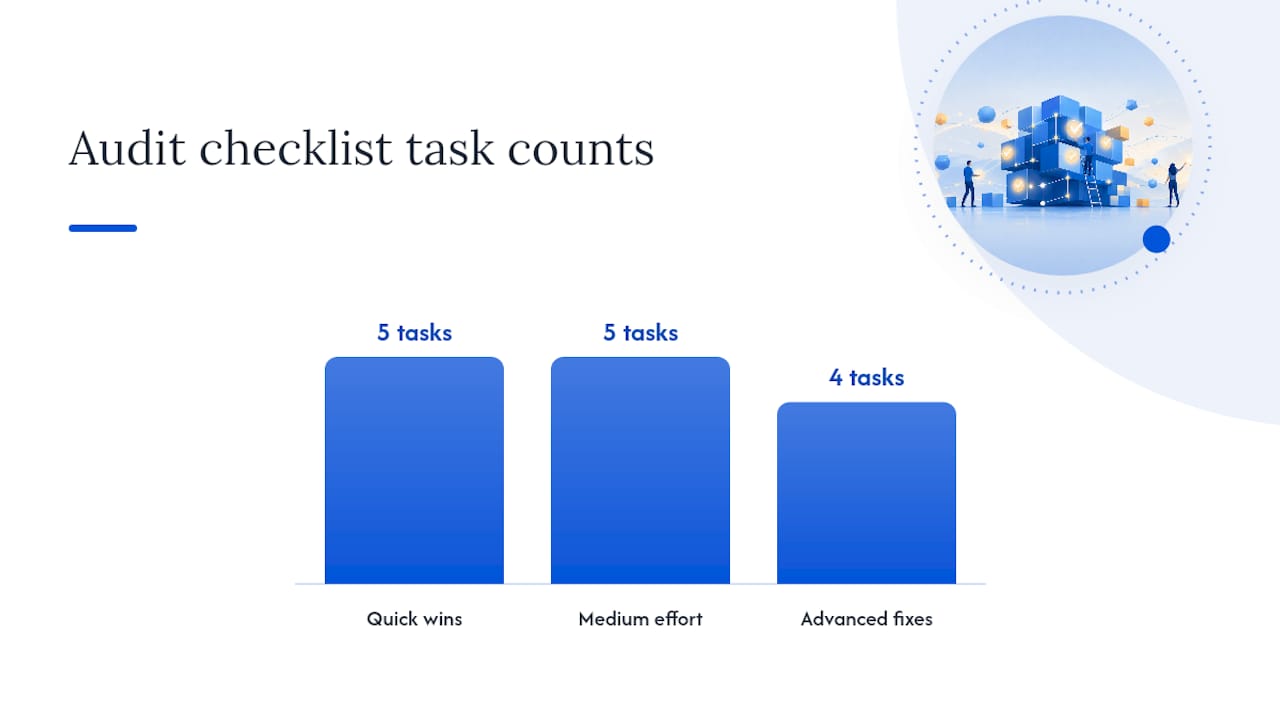
Quick wins (low effort, high impact):
- Submit your XML sitemap in Google Search Console.
- Fix any pages returning 404 errors that have inbound links.
- Add HTTPS if you haven’t already.
- Add a canonical tag to every page.
- Fix missing or duplicate title tags and meta descriptions.
Medium effort:
- Audit internal linking — make sure important pages have links pointing to them from multiple other pages.
- Fix Core Web Vitals failures identified in PageSpeed Insights.
- Add or correct structured data for your key page types.
- Resolve mobile usability errors in Search Console.
- Check for and fix redirect chains (A → B → C should become A → C).
Advanced fixes:
- Analyze server logs to see which pages Googlebot actually crawls and how often.
- Implement hreflang for multilingual or multi-regional sites.
- Address JavaScript rendering issues for dynamic content.
- Optimize crawl budget for large sites by removing low-value URLs from the sitemap.
| Tool | Primary use case | Who uses it |
|---|---|---|
| Google Search Console | Index coverage, crawl errors, Core Web Vitals field data | Site owner, SEO specialist |
| Lighthouse / PageSpeed Insights | Performance diagnostics, Core Web Vitals lab data | Developer, SEO specialist |
| Screaming Frog | Full site crawl, broken links, redirect chains, duplicate content | SEO specialist |
| Semrush | Site audit, keyword tracking, backlink analysis | SEO specialist, marketer |
| Ahrefs | Backlink audit, crawl analysis, content gap | SEO specialist, marketer |
For e-commerce sites, BigCommerce notes that faceted navigation and large product catalogs create special crawl budget challenges — filtering URLs can multiply your page count by thousands, most of which shouldn’t be indexed.
How do you decide which technical SEO fixes to tackle first?
An audit will almost always surface more issues than you can fix at once. The right prioritization framework is an impact-versus-effort matrix: place each fix on a grid where one axis is the potential ranking or traffic impact, and the other is the developer time and complexity required.
Three examples that illustrate how this works in practice:
- Fix a robots.txt blocking key pages: High impact, low effort. A one-line change in a text file can immediately restore crawl access to pages that may have been invisible for months. Do this first.
- Implement structured data for LocalBusiness: Medium impact, low-to-medium effort. It won’t move rankings directly, but it improves rich result eligibility and local visibility — worth prioritizing early.
- Migrate to server-side rendering for a JavaScript-heavy app: High impact, very high effort. This belongs on the roadmap, not the sprint — plan it carefully rather than rushing it.
To evaluate any fix before committing to it, run through these four questions:
- What’s the diagnostic cost? (How long to confirm the issue is real and scoped?)
- How much developer time does the fix require?
- What’s the ranking risk if left unfixed? (Is this blocking indexing, or just a missed opportunity?)
- What’s the revenue exposure? (Does the affected page drive leads, sales, or local calls?)
Fixes that score high on ranking risk and revenue exposure move to the top of the list, regardless of effort.
For a broader view of how technical SEO fits into your overall marketing approach, the types of SEO strategies guide on the Mysearchhero blog walks through where technical work sits relative to content and off-page efforts.
What tools and resources should every beginner use?
You don’t need a dozen tools. You need the right six, each used for a specific purpose:
- Google Search Console: Free. Shows index coverage, crawl errors, Core Web Vitals field data, and manual actions. Start here before anything else.
- Lighthouse / PageSpeed Insights: Free. Diagnoses performance, accessibility, and Core Web Vitals in both lab and field conditions. Built into Chrome DevTools.
- Schema.org: The canonical vocabulary reference for structured data. Use it to look up which properties to include for any schema type.
- Screaming Frog SEO Spider: Crawls your site the way Googlebot does. Finds broken links, duplicate content, missing tags, and redirect chains. Free up to 500 URLs.
- Semrush: Paid platform with a comprehensive site audit tool, keyword tracking, and backlink analysis. Good for ongoing monitoring.
- Ahrefs: Paid platform strong on backlink analysis and crawl reporting. Its technical SEO glossary is also a solid free reference.
For official implementation guidance, Google’s developer documentation covers every technical SEO topic with authoritative detail — robots.txt syntax, structured data requirements, mobile-first indexing rules, and more. Bookmark it.
How Mysearchhero handles technical SEO for clients
Mysearchhero’s managed service is built for local and service-based businesses that need SEO to work without requiring them to become technical experts. The process covers the full technical foundation: crawlability checks, HTTPS verification, structured data implementation, mobile parity review, and Core Web Vitals monitoring — all as part of a monthly content and SEO pipeline.
Service capabilities mapped to audit areas:
- Crawlability: Sitemap submission, robots.txt review, internal linking structure.
- Indexability: Canonical tag setup, noindex audits, redirect chain resolution.
- Performance: Core Web Vitals monitoring and recommendations.
- Structured data: Schema markup for LocalBusiness and Article types.
- Mobile: Mobile usability checks aligned with Google’s mobile-first indexing requirements.
- HTTPS: Certificate verification and mixed content review.
The right time to move from DIY to a managed service is when technical issues keep reappearing after fixes, when a site audit surfaces more than a handful of problems across multiple categories, or when the business simply doesn’t have the developer bandwidth to act on findings. For local businesses in competitive markets, the cost of leaving technical issues unaddressed usually exceeds the cost of professional help within a few months.
The part of technical SEO most beginners get backwards
Most guides tell you to start with metadata — title tags, descriptions, heading structure. That’s not wrong, but it’s also not where the leverage is for most sites.
The real priority is crawlability and indexability. If Googlebot can’t reach your pages, or if your pages aren’t being indexed, nothing else matters. A perfectly written title tag on a noindexed page does zero work. Core Web Vitals come next, because page experience now influences ranking directly — and because fixing speed issues often surfaces other structural problems worth addressing.
Metadata and on-page refinements are the last layer, not the first. They matter, but they’re the polish on a foundation that has to be solid first.
One non-obvious tip for maintaining technical health over time: add a basic technical SEO check to your site’s deployment or release checklist. Before any major update goes live, verify that robots.txt hasn’t changed unexpectedly, that no new noindex tags were added by accident, and that Core Web Vitals haven’t regressed. Most technical SEO disasters aren’t caused by neglect — they’re caused by a well-intentioned developer pushing a change that had an unintended side effect.
Mysearchhero gives local businesses a done-for-you SEO foundation
Running a local or service-based business means your time is already spoken for. Learning to audit robots.txt files, fix canonical misconfigurations, and monitor Core Web Vitals is a real skill set — one that takes months to develop and hours each week to maintain.

Mysearchhero handles the full pipeline: SEO articles published directly to your site, authority backlinks, Reddit brand mentions, and social media posts — all automated and delivered monthly. The content is crawlable, properly structured, and built to meet the technical requirements that determine indexing eligibility. You get the output of a functioning SEO operation without hiring an agency or managing a freelancer.
For businesses that have run a basic audit and know they need consistent execution, not just a one-time fix, Mysearchhero is the practical next step. Start with a free trial at Mysearchhero and see what a fully automated SEO pipeline looks like for your business.
Sources
FAQ
What is technical SEO in plain terms?
Technical SEO is the process of configuring a website’s infrastructure so search engines can crawl, render, index, and serve its pages. It covers elements like robots.txt, sitemaps, HTTPS, site speed, and structured data.
What’s the difference between technical SEO and regular SEO?
Regular SEO is a broad term covering content, links, and site structure. Technical SEO is the specific subset focused on the backend infrastructure — the settings and code that control how search engines access and process your site, rather than what the content says.
What is technical content in SEO?
Technical content in SEO typically refers to pages or documentation that explain how a site works — developer docs, API references, or setup guides. From a technical SEO standpoint, these pages still need proper crawl access, canonical tags, and structured data to rank effectively.
How much do technical SEO specialists earn?
Salaries for technical SEO roles vary widely by experience and market, with entry-level and senior roles differing significantly. Figures vary by region and company size and are not publicly listed by a single authoritative source.
Can a small business owner handle technical SEO without a developer?
Many foundational technical SEO tasks — submitting a sitemap, checking Google Search Console for errors, adding schema markup via a plugin, and switching to HTTPS — are manageable without coding skills. More complex fixes like JavaScript rendering issues or server-side rendering migrations typically require developer involvement.