
Call tracking helps you prove which organic pages and keywords actually generate phone leads, and it genuinely supports SEO when you set it up correctly. The catch is entirely technical: use Dynamic Number Insertion, keep your canonical number in the HTML and schema, and never let a tracking number leak into your citations. Before rolling it out site-wide, run one page through Google’s URL Inspection tool and confirm the rendered HTML still shows your real number.
TL;DR:
- Use dynamic number insertion to swap tracking numbers based on visitor source, ensuring your canonical number remains unchanged across all permanent listings.
- Verify that your real number appears in the rendered HTML and schema markup during each website update to prevent Google from detecting cloaking or NAP inconsistencies.
- Reserve and deploy tracking numbers only on your website, and avoid publishing them in citations or GBP profiles to prevent damaging local SEO rankings.
- Regularly audit citation profiles and Google Business Profile to ensure no tracking numbers leak into public directories or listings.
- Focus on measuring organic call volume, call duration, and qualified leads monthly to connect call data effectively with SEO performance and ROI.
Table of Contents
- How Call Tracking Works for SEO
- Does Call Tracking Hurt Local SEO?
- What SEO Metrics Should You Pull From Call Data?
- How Do You Implement Call Tracking Without Hurting SEO?
- Connecting Call Data to GA4, Search Console, and Your CRM
- Real Examples: Local Pages, Content, and Client Reporting
- Why This Only Works as Part of a Bigger Measurement Picture
- Get SEO-Safe Call Tracking Set Up and Reported Without the Trial and Error
- Sources
- FAQ
How Call Tracking Works for SEO
Dynamic Number Insertion (DNI) is the mechanism that makes call tracking safe for search rankings in the first place. Instead of hardcoding one phone number into your site, DNI swaps the visible number based on where a visitor came from (organic search, a paid ad, a specific referral) while your actual business number stays put in the underlying HTML and structured data. That distinction matters because it’s what prevents NAP inconsistency from creeping into your listings.
Static tracking numbers, by contrast, are typically fixed to one channel with no swapping logic. They’re simpler but far less useful if you want to know which landing page or keyword actually drove the call.
Most platforms manage this through number pools: a batch of local or toll-free numbers assigned dynamically to sessions, then released back into the pool once the session ends. Your canonical number gets ported or designated once, and that’s the number that should appear everywhere permanent: your footer schema, your Google Business Profile, your citations.
Each call typically captures:
- The landing page and referral source that triggered the number swap
- Session-level data (device, location, time on site before the call)
- Call duration and, on many platforms, a transcript or recording
- Caller ID and, where consent allows, name/number for CRM matching
That data is what turns a phone call from a black box into an attributable event, similar to a form submission. It’s directional intelligence rather than perfect accounting, since call tracking works best as a signal you layer onto existing analytics, not a replacement for them.
Does Call Tracking Hurt Local SEO?
Not if you respect one rule: your canonical number never moves. The moment a tracking number gets published somewhere permanent, like a citation site, a directory listing, or your Google Business Profile, you’ve created a NAP (Name, Address, Phone) inconsistency, and that’s the single biggest way call tracking damages local rankings.
Number leakage happens more easily than most business owners expect. A tracking number gets scraped by a data aggregator, cached by a directory that pulls from your website, or accidentally pasted into a GBP field during an update. Once that happens, Google sees conflicting phone numbers across the web and trust signals for your listing weaken. The safest policy is straightforward: reserve tracking numbers for your website only and never touch your GBP primary number field or your citation profiles.
Here’s the verification sequence worth running before and after every DNI deployment:
- Open Google Search Console and run URL Inspection on the page with DNI installed.
- Check the rendered HTML tab. Your canonical number should appear there, not the tracking variant.
- View the page’s noscript fallback (right-click, “view page source,” search for “noscript”). It should also show the canonical number.
- Cross-check your citation profiles (Yelp, GBP, industry directories) against your canonical number to confirm nothing has drifted.
- Repeat the URL Inspection check quarterly, especially after any CMS or plugin update.
This isn’t optional busywork. Historical guidance from Search Engine Journal’s technical analysis has long flagged that if Googlebot renders a page and sees a tracking number instead of your real one, you’re one step from looking like you’re cloaking content, even though nothing malicious is happening.
Pro Tip: Screenshot your URL Inspection results the first time you verify a page. Six months later, when you’re troubleshooting a ranking dip, you’ll have a clean baseline to compare against.
What SEO Metrics Should You Pull From Call Data?
Once calls are flowing into your tracking platform, the real question becomes which numbers actually belong in an SEO report. Not every call is equal, and not every metric tells you something useful.
The core set worth tracking monthly:
- Organic calls by landing page — which pages generate the phone, not just the click
- Calls by keyword, where your platform supports keyword-level attribution
- Call duration, as a rough proxy for lead quality
- Qualified-call rate — the percentage of calls that meet your definition of a real lead
- Estimated value per qualified call, based on your average close rate and deal size
Duration thresholds matter more than people assume. A call under 30 seconds is usually a wrong number, a hang-up, or someone checking hours. Most agencies treat 60 to 90 seconds as the floor for a “meaningful” conversation, since that’s roughly how long it takes to explain a real need and get a real answer. Anything shorter skews your qualified-call rate upward without reflecting actual demand.
A monthly SEO call report doesn’t need to be complicated. Three sections cover it: total organic calls for the period, your top five pages by call volume, and an estimated revenue figure based on qualified calls times your average deal value. That last number is what turns a call log into a business case, and it’s the same local ROI logic agencies use to justify continued SEO spend to skeptical clients.
How Do You Implement Call Tracking Without Hurting SEO?
Getting DNI live without creating a NAP problem comes down to sequence; for practical tips, see call tracking for small business. Skip a step here and you’ll spend weeks untangling a ranking issue that a five-minute check would have caught.
Before you deploy:
- Choose a DNI-capable provider, since static-only tracking tools won’t give you the swap logic you need.
- Designate or port one canonical number and commit to using it everywhere permanent (GBP, citations, business cards, invoices).
- Write a one-page citation policy so nobody on your team accidentally publishes a tracking number anywhere public.
During implementation:
- Install the DNI snippet on the pages you want tracked, usually your homepage, service pages, and location pages.
- Verify the canonical number still appears in the rendered HTML and in your schema markup (LocalBusiness or Organization markup, specifically the
telephonefield). - Add a noscript fallback that displays the canonical number, not the tracking variant, for any visitor or bot that doesn’t execute JavaScript.
- Set local area codes on your tracking numbers where possible; a mismatched area code (a 212 number on a Denver plumbing site) reads as inauthentic to visitors even if it doesn’t directly hurt rankings.
- Test tap-to-call behavior on an actual mobile device, since mobile visitors are far more likely to dial straight from the search result or landing page.
After you go live:
- Run URL Inspection on every page with DNI to confirm nothing broke.
- Simulate a few sessions yourself and check that the right number and attribution data show up on the back end.
- Audit your citations and GBP profile for any accidental number drift.
- Monitor attribution data for 30 days before making decisions off it. Call volume needs a full month to smooth out weekday and seasonal noise.
Pro Tip: Do the citation audit again 60 days after launch, not just once at deployment. Directories re-scrape sites on their own schedule, and a leaked number sometimes surfaces weeks later.
Connecting Call Data to GA4, Search Console, and Your CRM
Call tracking only earns its keep once the data lands somewhere you actually look. Most platforms let you push call events into GA4 as a conversion event, tagged with the landing page and session details that triggered the call. That’s the piece that turns a phone call into something your existing dashboards already understand.
From there, cross-referencing with Google Search Console closes the loop. If a page generates strong impressions and clicks but weak calls, that’s a page worth revisiting. If a low-traffic page punches above its weight in calls, that’s a signal to build more content around whatever keyword is sending that traffic.
On the CRM side, a few integrations do most of the work:
- Auto-log every tracked call as an activity record, tagged with its source
- Route qualified calls to sales and mark disqualified ones separately
- Feed a lead-quality score back into your SEO reporting so “organic calls” isn’t just a volume number
This is also where tying conversion data to broader SEO tracking pays off, since a call is just one conversion path among several you should be watching together.
Real Examples: Local Pages, Content, and Client Reporting
The clearest use case shows up on location pages. A business with five city-specific pages can look at organic call volume per page and immediately see which two are working and which three need better content or local schema, a pattern BrightLocal’s research on local call tracking has documented repeatedly.
Content teams get a second win almost for free: caller transcripts and notes reveal the exact phrasing customers use, which often surfaces keyword variations and FAQ topics nobody thought to target on the page itself.
- A city page ranking for “emergency plumber [city]” generates triple the calls of a nearly identical neighboring page, pointing straight at a content gap.
- Transcripts reveal callers repeatedly asking about weekend availability, prompting a new FAQ section and a fresh long-tail keyword target.
- An agency builds a client’s quarterly report around estimated revenue from qualified organic calls, not just rankings or traffic, which is a far easier number for a business owner to trust.
Why This Only Works as Part of a Bigger Measurement Picture
Call tracking is the most underused SEO signal in most small business marketing stacks, and the conventional advice around it gets one thing backwards. Most guides treat it as a “nice to have” add-on for local businesses. It should be treated as core conversion data, on par with a form fill, especially for any industry where people would rather call than type.
Where the standard advice falls short is the assumption that installing DNI is the finish line. The real work is the ongoing verification: rerunning URL Inspection, re-auditing citations, and rechecking your noscript fallback every time a developer touches the site. Skip that maintenance and you’ll eventually leak a tracking number into a directory without noticing for months.
Prioritize the boring part first: get your canonical number locked down everywhere before you chase attribution sophistication. A perfectly configured GA4 dashboard built on top of an inconsistent NAP profile is optimizing the wrong problem. Fix the foundation, then build the reporting on top of it, not the other way around.
— Mike
Get SEO-Safe Call Tracking Set Up and Reported Without the Trial and Error
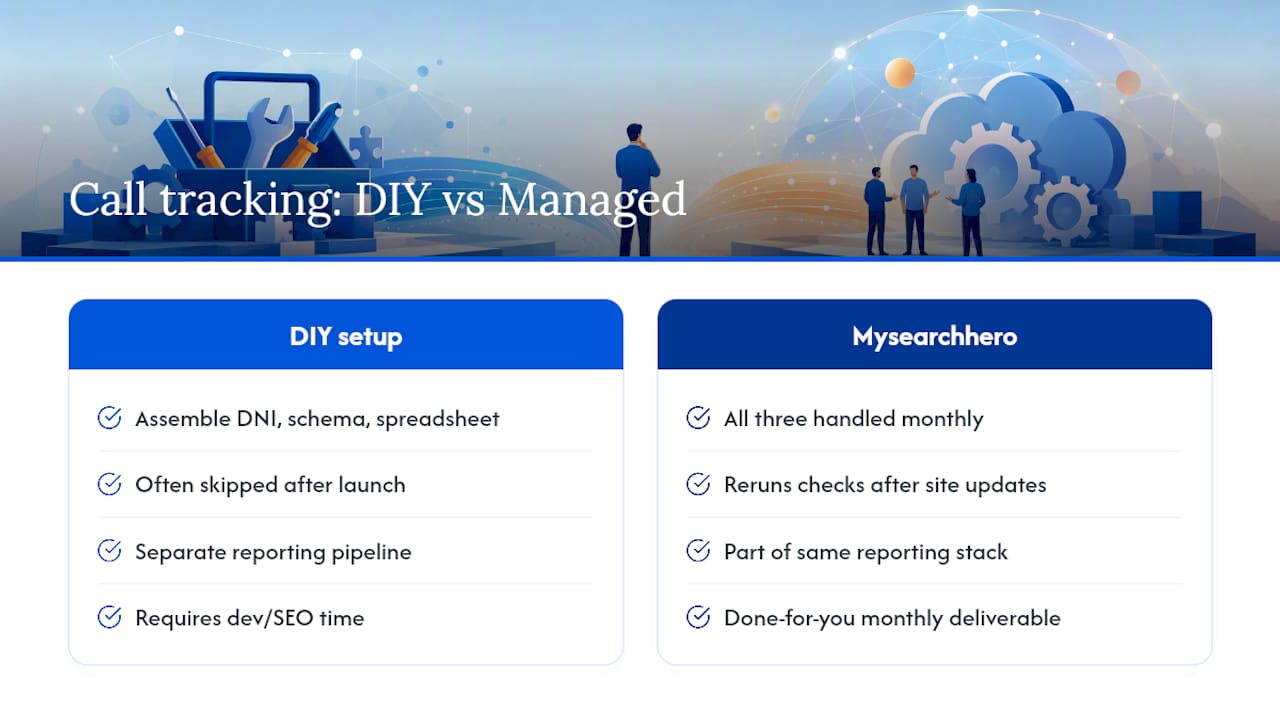
Mysearchhero is the alternative to hiring a developer and an SEO consultant separately to get call tracking right. Instead of piecing together a DNI provider, a schema fix, and a monthly reporting spreadsheet on your own, you get all three handled as part of the same monthly deliverable cycle, alongside the published articles, backlinks, and reporting you’re already tracking.

The setup work described in this guide, DNI configuration, canonical number verification, noscript checks, GA4 event mapping, is exactly the kind of technical maintenance that gets skipped when you’re running a business and don’t have a spare afternoon for URL Inspection audits. A managed approach means someone is actually rerunning those checks after every site update, not just at launch. Combine that with proven local SEO tactics already built into your monthly plan, and your call data becomes part of the same reporting stack that tracks your rankings and traffic.
If you want your phone leads attributed correctly without becoming the person who has to remember to check schema markup, start with Mysearchhero and see what a done-for-you setup looks like for your site.
Sources
For deeper technical detail, see CallRail’s guide to call tracking and Search Engine Journal’s analysis of call tracking and SEO.
- Call Tracking for Local Businesses: How to Set It Up and Why You Should
- The truth about call tracking and SEO
- Call Tracking as an SEO intelligence tool
FAQ
Is Call Tracking Bad for SEO?
No. Call tracking is SEO-safe when configured correctly, meaning your canonical number stays in the HTML, schema, and citations while only the visible number swaps for tracking purposes.
What Is the Best Call Tracking Software?
The right choice depends on whether you need DNI, CRM integration, and GA4 event support, since not every platform offers all three. Look for a provider with proven DNI capability and clear documentation on schema and noscript handling before choosing based on price alone.
How Much Does Call Tracking Cost?
Pricing varies widely by provider, number volume, and whether transcription or CRM integration is included, so there’s no single industry-standard figure. Budget-conscious businesses can often start with a small number pool and expand as call volume and attribution needs grow.
Is SEO Dead Now That AI Search Exists?
No. Organic visibility still drives a large share of traffic and phone leads for local businesses, and call tracking is one of the clearest ways to prove that value still exists even as search results change format.
What Is the 80/20 Rule in SEO?
Applied to call tracking, it means a small share of your pages and keywords typically generate most of your qualified calls. Identifying that top 20% through call data lets you focus content and optimization effort where it actually moves revenue.