
LocalBusiness schema is a JSON-LD block that tells search engines your business’s exact name, address, phone number, and hours. Add one block per location, use the most specific subtype your business qualifies for, and make sure every value matches your Google Business Profile exactly. Validate the code with Google’s Rich Results Test before you publish, then check back in a few weeks.
TL;DR:
- Using specific subtypes like
RestaurantorDentistinstead ofLocalBusinessunlocks tailored properties that improve search engine understanding.- Ensuring your schema’s name, address, and phone number match your Google Business Profile exactly is critical for avoiding entity confusion.
- Validation with Google’s Rich Results Test is essential after publication, and errors often stem from incorrect formatting or mismatched data fields.
- Multi-location businesses should implement a parent
Organizationblock for the brand and individualLocalBusinessblocks per location with unique IDs and linkedparentOrganization.- Correct schema implementation supports rich results and entity clarity but does not directly influence rankings, which rely more on profile completeness, proximity, and reviews.
Table of Contents
- What Is LocalBusiness Schema, Exactly?
- What Does Local Business Schema Actually Get You?
- Required and Recommended Fields for Your Markup
- Which Subtype Should You Use, and What Does It Look Like?
- How Do I Add a Local Business Schema to My Website?
- How Do I Handle Multi-Location Schema Correctly?
- How Do I Validate My Structured Data?
- What Are the Most Common Schema Errors, and How Do You Fix Them?
- Why Trust This Approach to Local Schema?
- An Implementer’s Take on What Actually Moves the Needle
- Let Mysearchhero Handle Your Schema Rollout
- Sources
- FAQ
What Is LocalBusiness Schema, Exactly?
LocalBusiness schema is structured data, usually written in JSON-LD format, that describes your business as a machine-readable entity rather than just text on a page. Instead of a search engine guessing at your hours from a paragraph in your footer, the markup states them directly: "openingHours": "Mo-Fr 09:00-17:00". That precision is the whole point.
Schema defines LocalBusiness as a broad type with dozens of subtypes underneath it, covering everything from Restaurant and Dentist to AutoRepair and Plumber. Each subtype inherits the base LocalBusiness properties and adds its own. A restaurant can specify servesCuisine and menu. A dentist can specify medicalSpecialty. Picking the right subtype hands search engines context they can’t get from a generic label.
Here’s where a lot of business owners get confused: schema markup does not replace your Google Business Profile (GBP), and it doesn’t directly move you up in the local map pack. What it does is feed structured, unambiguous data to search engines and AI systems that increasingly summarize the web rather than just linking to it. When a chatbot pulls together an answer about “dentists open on Saturday near downtown,” clean structured data is part of how it decides what’s accurate.
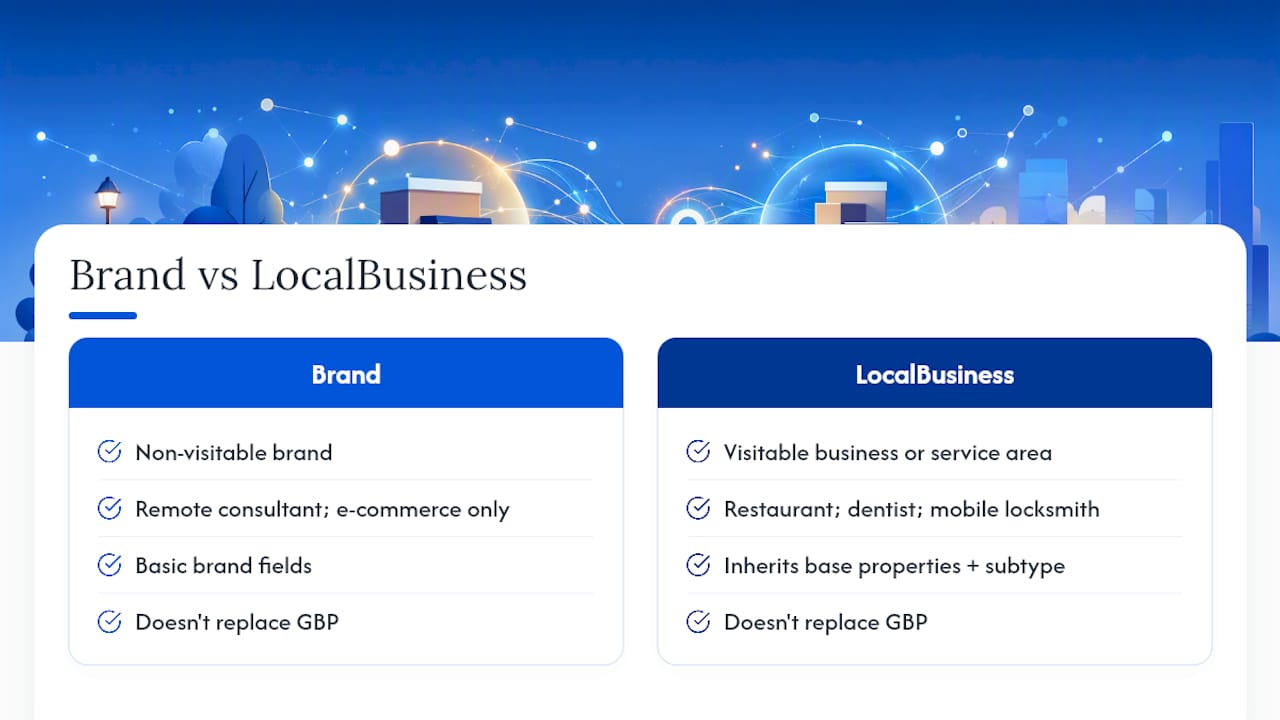
So when should you use Organization instead of LocalBusiness? Use Organization for a brand that doesn’t operate from a fixed, visitable address, like a fully remote consulting firm or an e-commerce-only company. Use LocalBusiness (or its most specific subtype) any time customers can visit a physical location or you serve a defined geographic area, even without a storefront, as with a mobile locksmith or a home-service contractor. Multi-location brands typically use both: one Organization block for the parent brand, and one LocalBusiness subtype block per location.
What Does Local Business Schema Actually Get You?
The honest answer: entity clarity, a shot at richer search results, and a forcing function for NAP (name, address, phone) consistency. It’s not a ranking lever on its own.
Search engines assemble what they know about your business from dozens of signals scattered across the web. Schema markup consolidates that into one clean statement on your own site. When your JSON-LD name, address, and phone number match your GBP listing character for character, you remove one of the most common sources of entity confusion. That consistency is arguably the single biggest factor in avoiding a search engine treating your listing and your site as two different, competing entities, according to one implementation guide.

Rich results are the visible payoff. Correctly marked-up pages become eligible for enhanced listings that can show star ratings, hours, or price range directly in search results, which tends to improve click-through rate even without a ranking change. Eligible is the key word. Google decides whether to actually display the enhancement, and it can revoke that display at any time without notice.
It’s worth being blunt about what schema doesn’t do. Your position in the local pack depends overwhelmingly on your Google Business Profile completeness, physical proximity to the searcher, and review volume and quality. LocalBusiness schema supports that work; it doesn’t substitute for it.
The lift is biggest in two scenarios: a single, well-established location adding schema for the first time and immediately fixing NAP mismatches, or a multi-location business rolling out consistent per-location markup across every store page at once. Half-finished multi-location rollouts, where three of ten locations have markup and the rest don’t, tend to underperform both a full rollout and no rollout at all.
Required and Recommended Fields for Your Markup
Get the required fields right first. Everything else is a bonus layered on top.
Required properties, per Google’s structured data documentation:
@type: Use the most specific subtype available (Restaurant,Dentist,Electrician), not the genericLocalBusiness.name: Your exact business name, matching your signage and your GBP listing.address: A nestedPostalAddressobject withstreetAddress,addressLocality,addressRegion,postalCode, andaddressCountry.telephone: Your primary contact number, including the country code.url: The canonical URL of the page the schema lives on.
Recommended properties that strengthen the block without being mandatory:
geo: Latitude and longitude as aGeoCoordinatesobject, useful for proximity-based results.openingHoursSpecification: Structured hours usingdayOfWeekand 24-hour time format, rather than a plain-textopeningHoursstring.image: At least one high-quality photo URL representing the business.priceRange: A simple indicator like$$for cost expectations.sameAs: An array linking to your verified social profiles and GBP URL.aggregateRating: Only include this if the actual star rating and review count are visibly displayed on that same page. Marking up reviews that aren’t visible to a human visitor violates Google’s structured data guidelines and can trigger a manual action.
Pro Tip: Formatting mistakes cause more validation failures than missing fields. Use 24-hour time (09:00, not 9:00 AM) inside openingHoursSpecification, always include the country code in telephone (+1 for the United States), and keep @id values identical every time that entity appears across your site.
One statistic worth internalizing: Google’s own documentation frames only five properties as strictly required, name, address, telephone, openingHoursSpecification, and url. Everything else is optional enhancement. If you have fifteen minutes and a busy week ahead, those five fields are where that time goes.
Which Subtype Should You Use, and What Does It Look Like?
Generic LocalBusiness markup works, technically. It’s also a missed opportunity. Schema.org’s type hierarchy rewards specificity: the more precise your subtype, the more subtype-specific properties become available, and those properties give search engines and AI tools sharper context about exactly what you do.
A coffee shop marked up as generic LocalBusiness tells search engines almost nothing beyond “a business exists here.” The same shop marked up as CafeOrCoffeeShop unlocks properties tied to food service. A law firm using Attorney instead of LocalBusiness can specify areaServed and practice-area details that a generic block simply doesn’t support.
Here’s a rough map of how common business categories translate into schema subtypes:
| Business Category | Recommended Subtype | Notable Extra Properties |
|---|---|---|
| Restaurant, cafe, bakery | Restaurant, CafeOrCoffeeShop, Bakery |
servesCuisine, menu, acceptsReservations |
| Medical or dental practice | Dentist, Physician, MedicalClinic |
medicalSpecialty, availableService |
| Legal services | Attorney, LegalService |
areaServed, knowsLanguage |
| Home services (plumbing, HVAC, electrical) | Plumber, HVACBusiness, Electrician |
areaServed, serviceType |
| Retail store | Store, or a more specific retail subtype |
paymentAccepted, currenciesAccepted |
| Auto services | AutoRepair, AutoDealer |
brand, makesOffer |
A compact example for a single-location restaurant, stripped down to essentials, would nest PostalAddress and GeoCoordinates inside a Restaurant type, use openingHoursSpecification with structured days and 24-hour times, and set a stable @id, something like https://example.com/#restaurant. That same @id value becomes the anchor point that links a location’s LocalBusiness block back to a parent Organization block through the parentOrganization property, which matters the moment you open a second location.
How Do I Add a Local Business Schema to My Website?
You have three realistic paths: hand-code it, use a plugin, or template it across a CMS. Which one fits depends on how many locations you’re managing and how comfortable you are editing raw code.
- Hand-code the JSON-LD. Write the script directly in a text editor, following the property list from the section above. This gives you full control and no plugin dependency, but it means manually updating every location’s file when hours or details change.
- Use a CMS plugin. WordPress users have several structured-data plugins that generate LocalBusiness JSON-LD from fields you fill in through a form, no code required. This is the fastest route for a single-location business with no developer on staff.
- Build a template for programmatic pages. If you manage ten or fifty location pages, hand-coding each one doesn’t scale. Build one JSON-LD template that pulls name, address, phone, and hours from your location database, and generate the block dynamically per page.
Placement matters more than most guides admit. The <script type="application/ld+json"> tag typically lives in the <head> of the page, though it works in the <body> as well; what matters is that it appears once per location, not once globally with hardcoded values that don’t match every page it renders on. JSON-LD is Google’s recommended format precisely because it sits as a self-contained script block, separate from your visible HTML, which makes it far easier to maintain than microdata or RDFa embedded directly into your page markup.
Versioning is the part people forget. Once you publish an @id for a location, treat it as permanent. Changing it later breaks the link between that location’s schema and anything else referencing it, including a parent Organization block. Keep your canonical URL and your schema url property pointing at the exact same address, including protocol and trailing slash, so search engines never have to guess which page is authoritative.
Pro Tip: If you’re rolling out schema across dozens of locations, a lightweight automation layer, even a spreadsheet feeding a template, saves hours over manually editing each page. A practical approach to AI-assisted SEO work can help you build that kind of repeatable system without hiring a developer for every update.
If your business already spans multiple pages built from templates, it’s worth reviewing your broader local SEO strategy for 2026 alongside your schema rollout, since the two reinforce each other.
How Do I Handle Multi-Location Schema Correctly?
Multi-location businesses need a structure, not just repeated code. The pattern that works consistently: one Organization block for the parent brand, published sitewide, and one LocalBusiness subtype block per individual location page.
- Each location gets its own JSON-LD block with a unique, stable
@id. - The parent brand gets a single
Organizationblock, also with its own@id. - Every location’s block includes a
parentOrganizationproperty referencing the brand’s@id, explicitly linking the two. - Practitioners generally recommend this exact pairing for multi-location chains rather than trying to cram every location into one oversized block.
- Stable
@idvalues across pages improve how search engines associate individual locations with the broader brand.
Programmatic location pages carry their own risks. If you’re generating fifty near-identical pages from a template, each one needs genuinely unique visible content, not just a swapped city name, because thin duplicate content undermines the very entity clarity you’re trying to build with schema. Each page also needs its own accurate JSON-LD block reflecting that specific location’s real address and hours, not a copy-pasted block with one field changed.
Canonical tags matter here too. Every location page should canonicalize to itself, not to a central “locations” hub page, or you risk telling search engines that individual locations aren’t distinct entities worth indexing separately. For a deeper look at scaling this correctly, a guide on programmatic local pages covers the content side of this problem in more detail, and a broader multi-location SEO guide is worth reading before you roll markup out past three or four locations.
How Do I Validate My Structured Data?
Validation isn’t optional, and it isn’t a one-time step either.
- Run every page through Google’s Rich Results Test first. It tells you specifically whether your markup qualifies for enhanced search features.
- Cross-check with the Schema.org Structured Data Validator, which checks broader schema compliance beyond just what Google currently supports.
- Once live, monitor the structured data enhancement reports inside Google Search Console. These flag errors on pages Google has already crawled, sometimes weeks after you published.
- Distinguish errors from warnings. Errors typically block rich result eligibility entirely; warnings flag missing recommended fields but usually don’t disqualify the page.
- Check back roughly every two to four weeks after a schema rollout, and immediately after any site migration, template change, or CMS update.
- If Search Console flags a spike in errors, check whether a recent template change broke the JSON-LD output sitewide rather than assuming it’s an isolated page issue.
What Are the Most Common Schema Errors, and How Do You Fix Them?
Most LocalBusiness schema failures trace back to four repeat offenders, and Search Engine Journal’s breakdown of common local schema mistakes covers all of them.
- NAP mismatch with your Google Business Profile. If your schema lists “123 Main St.” and your GBP lists “123 Main Street,” that’s a mismatch search engines notice. Fix it by picking one canonical format for your name, address, and phone, and updating every instance across your website, GBP, and any directory listings you control.
- Wrong or overly generic subtype. Using plain
LocalBusinesswhen a more specific type exists wastes an opportunity. Browse schema.org’s LocalBusiness hierarchy directly to find the closest match to what you actually do. - Malformed JSON-LD. A missing comma, an unescaped quotation mark, or an incorrect time format (
9:00aminstead of09:00) will throw a validator error. Run the script through a JSON linter before you even test it in Google’s tool. - Improper review markup. Only include
aggregateRatingif the star rating and review count are visibly displayed on that exact page. Marking up invisible or off-page reviews is a policy violation, not just a technical error.
Why Trust This Approach to Local Schema?
This guide leans on primary sources wherever possible: Google’s own structured data documentation, the schema.org type definitions themselves, and validator tools that give you a pass/fail answer rather than a guess. That’s a deliberate choice. Local SEO advice online is full of confident claims that don’t survive contact with an actual validator.
Some services build content and local SEO deliverables around the principle that markup and content need to match what’s actually true about a business, published consistently, and checked against real tools rather than assumptions. If you’re evaluating your own setup, pairing this guide with a broader look at local business marketing strategies gives you the fuller picture of where schema fits into everything else driving local visibility. The recommendations above map directly to what a properly configured local presence actually needs: correct fields, correct subtype, and validated code, in that order.
An Implementer’s Take on What Actually Moves the Needle
Most schema advice buries the one thing that matters most under twenty things that matter less. If you only fix one thing this week, fix NAP consistency between your schema, your website footer, and your Google Business Profile. That single mismatch causes more entity confusion than a missing priceRange or an absent sameAs array ever will.
The five required fields aren’t a suggestion, they’re the floor. Get @type, name, address, telephone, and url exactly right before you spend another minute on geo coordinates or review markup. I’ve seen business owners spend an afternoon polishing optional fields on a block that had the wrong phone number the entire time.
When does it make sense to hand this off? If you’re managing more than a handful of locations, or you don’t have time to re-check your markup every time Google updates its guidelines, a managed service starts to make more sense than DIY. The fundamentals here don’t change. What changes is who’s watching for the drift.
— Mike
Let Mysearchhero Handle Your Schema Rollout
Mysearchhero is the alternative to hiring a developer every time your hours change or you open a new location. Instead of hand-coding JSON-LD and re-checking it every quarter, you get schema implementation folded into a monthly content and SEO subscription that also covers published articles, backlinks, and ongoing monitoring.

Handled the right way, that means correct per-location LocalBusiness blocks, exact-match NAP across your site and your Google Business Profile, and validation built into the rollout rather than left for you to remember. If you run more than one location, or you’d simply rather not become your own structured-data technician, that’s exactly the gap a done-for-you service is built to close. Complementary reading on proven local SEO tactics shows how schema fits into the bigger picture Mysearchhero builds around your business each month.
Visit the Mysearchhero landing page to see current plans and start a conversation about getting your local schema, and the rest of your local SEO, handled without adding it to your own to-do list.
Sources
- Local Business (LocalBusiness) Structured Data
- Schema
- LocalBusiness Schema: Complete Guide (2026)
- Local Business Schema Markup: JSON-LD Guide for 2026 – Gatilab
- Local SEO Schema: A Complete Guide To Local Structured Data & Rich Results
FAQ
What Is a Local Business Schema?
It’s a structured data block, typically written in JSON-LD, that identifies your business’s name, address, phone number, hours, and other core details in a format search engines can read directly rather than infer from page text.
Can You Give Me an Example of a LocalBusiness Schema?
A basic example nests a PostalAddress object with your street, city, state, and zip inside a Restaurant or other specific subtype, adds telephone and url, and lists hours through openingHoursSpecification in 24-hour format.
How Do I Add a Local Business Schema to My Website?
Hand-code the JSON-LD in a script tag, use a CMS plugin that generates it from form fields, or build a template for programmatic location pages, then validate every version with Google’s Rich Results Test.
What Is a Business Schema?
“Business schema” usually refers to either Organization (for brands without a fixed customer-facing address) or LocalBusiness and its subtypes (for businesses with a physical location or defined service area); most local businesses need the latter.
Does Adding Schema Guarantee Better Local Rankings?
No. Schema improves entity clarity and rich result eligibility, but your position in the local map pack depends primarily on your Google Business Profile, proximity, and reviews, with schema playing a supporting role rather than a direct ranking factor.