
A service area page is a page built for one service and one place you drive to, not a storefront address. Build one only when it can carry real local proof, whether that’s a completed job, a named neighborhood, or a photo shot on-site. Skip it if the plan is a city-name swap on a template. That single test decides everything else in this guide, including which pages need LocalBusiness schema and which ones need to be deleted.
TL;DR:
- Building a service area page requires actual proof of work in the location, such as completed jobs or localized testimonials, to avoid Google’s spam guidelines.
- Use
areaServedschema instead of a physical address when your business travels to the location, and avoid fake addresses to prevent account suspension.- Prioritize creating a few high-quality, proof-driven pages over numerous templated ones, as the latter increase doorway-page risks and often underperform in rankings.
- Incorporate unique local details, like neighborhood names or specific project types, to make each city page genuinely distinct and improve search relevance.
- Measure success through local impressions, clicks, phone calls, and time-on-page, focusing on lower-competition suburbs first for faster initial results.
Table of Contents
- What Are Service Area Pages, and How Do They Differ From Location Pages?
- Should You Build a Service Area Page, Skip It, or Fix the Foundation First?
- What Should a Service Page Include to Convert and Rank?
- How Do You Make Each City Page Genuinely Unique?
- How Should You Structure and Link Your Service Area Pages?
- What Are the Warning Signs of a Doorway Page, and How Do You Audit Your Set?
- How Do You Measure Whether Service Area Pages Are Working?
- Author Perspective: When Scaling City Pages Actually Pays Off
- How Mysearchhero Builds Service Area Pages That Don’t Read as Templates
- Sources
- FAQ
What Are Service Area Pages, and How Do They Differ From Location Pages?
A service area page targets a specific service in a place you travel to, not a place where customers walk in. A mobile notary in Austin, a plumber covering three suburbs of Denver, an HVAC company that services a 40 mile radius around its shop: none of them have a public storefront in every town they list, so a “location page” (built around a staffed address) would be inaccurate. A service area page solves that mismatch by describing the service, the coverage zone, and the proof that the work actually happens there, without claiming a physical office exists.
The distinction matters for search intent, too. Location pages tend to answer queries like “plumber near me” from someone standing a few blocks away. Service area pages answer a wider range: “emergency plumber Round Rock,” “HVAC repair outside Denver metro,” “mobile notary who comes to your house in Cedar Park.” Those searches assume the business travels, so the page needs to say so plainly, right in the first paragraph.
Here’s where the two page types split in practice:
- Location page: business has a staffed address at that spot; use the physical address in schema and Google Business Profile.
- Service area page: business serves the area but does not staff an office there; use
areaServedin schema instead of a fake address. - Hybrid case: a business with one shop location and ten surrounding service towns needs one location page and up to ten service area pages, not eleven identical location pages.
Confusing the two is a common early mistake. Listing a fake business address in a town you don’t actually staff violates Google’s own guidelines and risks account suspension, not just a ranking penalty.
Should You Build a Service Area Page, Skip It, or Fix the Foundation First?
Not every city on your service list deserves its own page. The decision comes down to whether you can fill that page with something a competitor in the same city can’t copy. If you can’t, you’re better off strengthening what you already have.
Run through this order before you write a single word:
- Check for real work history. Have you completed actual jobs in that city, with a name, a date, or a project you can describe? If yes, that’s your foundation. If no, wait until you have some.
- Check for local proof you can show. A testimonial naming the neighborhood, a photo from the job site, a permit quirk specific to that municipality. No proof, no page yet.
- Check your Google Business Profile accuracy first. If your service area list on your GBP is incomplete or your primary category is off, fix that before building out pages. This is the highest-leverage fix most businesses skip.
- Check your core service pages. A weak “Plumbing Services” page with no depth will drag down every city page you link to it. Fix the parent page before multiplying children.
- Check your review coverage. If you have zero reviews mentioning a target city, that’s a signal to build reviews there before building the page.
Skip the page entirely when the only plan is copying your template and swapping “Denver” for “Aurora.” That’s the exact pattern that Google’s own doorway-page guidance targets, and one bad batch of templated pages can drag down pages that were doing fine.
Pro Tip: Build your Google Business Profile and your two or three strongest core service pages before you touch a single city page. A weak foundation under ten thin pages fails faster than a strong foundation under three good ones.
What Should a Service Page Include to Convert and Rank?
The page needs to do two jobs at once: tell a search engine exactly what service and place it covers, and tell a visitor within five seconds that you actually work there. Skimping on either one kills the page’s purpose.
Start with the technical basics:
- URL slug: pattern like
/hvac-repair/aurora-co/, plain and readable. - Title tag: service plus city plus a differentiator, kept under 60 characters.
- H1: matches the title’s service and city combination exactly.
- Meta description: names the neighborhood or ZIP range you serve, not just the city.
Then the conversion layer, which most guides underweight compared to SEO mechanics:
- A phone number visible without scrolling, plus a text/SMS option if you offer one.
- A booking or quote-request CTA above the fold, not buried after 800 words of copy.
- Clear next-step language: “We can be at your door in Aurora within two hours” beats a generic “contact us.”
Local proof is the piece that actually separates a real page from a template. Two or three city-specific testimonials, thumbnails from completed jobs in that area, and an explicit list of neighborhoods or ZIP codes you cover all pull weight here, and industry data consistently ties that kind of specificity to stronger local rankings.
Aim for roughly 40 to 60 percent unique, location-specific content on each page, which in practice works out to around 800 words of material that couldn’t be copy-pasted onto a different city’s page without editing. If you can swap the city name and nothing else needs to change, you’re under that threshold.
One UX detail worth flagging: don’t drop a map pin at a fake address just to look local. Use a service radius overlay or a plain list of covered towns instead.
How Do You Make Each City Page Genuinely Unique?
Think of every city page as sitting on three layers, borrowed from an entity-attribute model that practitioner audits use to test whether a page survives scrutiny.
The Root layer is your shared template: your business name, your core service description, your general trust signals. Every page has it, and that’s fine. The Rare layer is content a handful of competitors might also have: response time claims, licensing details, seasonal notes. The Unique layer is content nobody else can produce, because it’s tied to your specific work in that specific place.
Unique-layer content looks like this in practice:
- A list of the actual neighborhoods you’ve worked in, not just the city name (Cedar Park’s Buttercup Creek versus its Anderson Mill area, for instance).
- A note about a local permit requirement or inspection quirk specific to that municipality.
- A mention of a building type common to that area (slab foundations in one suburb, older brick housing stock in another) and how your service handles it.
- A named local partner, supplier, or subcontractor you work with in that zone.
- A project photo with a caption naming the street or neighborhood, not a stock image.
Schema is where you make that uniqueness legible to search engines. Use LocalBusiness or Service schema at the page level, and set the areaServed property to the specific city or region that page covers rather than a generic company-wide value. Layer in FAQ schema for the questions specific to that location, and Review schema if you have genuine, city-tagged reviews to attach.
Pro Tip: Before publishing, check that everything in your schema markup is visible somewhere on the page itself. If your schema claims a review that doesn’t appear anywhere in the visible content, that mismatch is exactly the kind of gap a manual review catches.
How Should You Structure and Link Your Service Area Pages?
The safest architecture is hub-and-spoke: one “Areas We Serve” hub page linking out to individual city pages, and each city page linking sideways to your relevant service pages. That structure gives Google a clear map of what each page is for, and it gives visitors an obvious path if the city they landed on isn’t quite the one they meant.
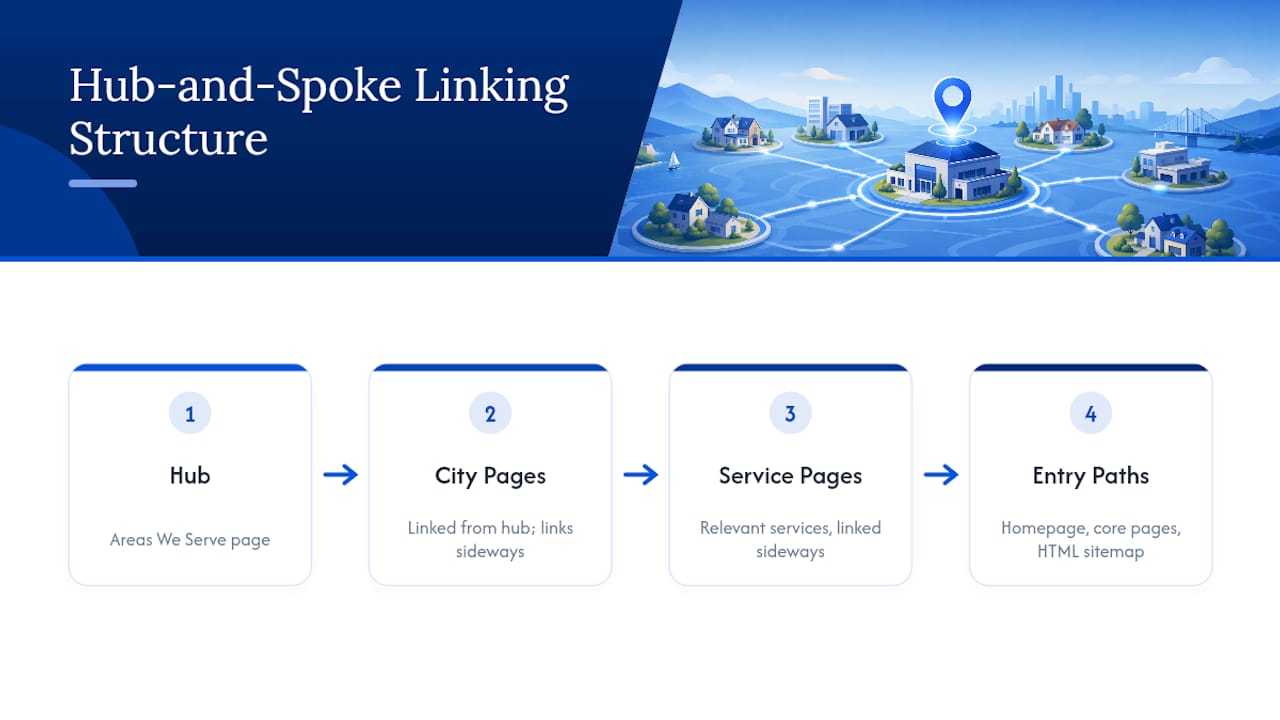
Link into your city pages from a small number of deliberate places: your homepage navigation, your core service pages (“we also serve Round Rock” style callouts), and a clean HTML sitemap. What you want to avoid is a giant flat list of forty city links crammed into your footer, which reads to both users and crawlers as a doorway funnel rather than a real navigation structure, a pattern Search Engine Land’s guidance specifically flags as a red flag.
Scaling advice that holds up in practice: start with three to eight cities, not thirty. Pick them by where you already have work history and where search demand is real, not by drawing a circle on a map and listing every town inside it. Add more only after the first batch is ranking and converting.
Every internal link should carry a clear signal about the linked page’s purpose. “HVAC Repair in Aurora, CO” as anchor text tells Google (and the visitor) exactly what’s on the other end. Vague anchors like “click here” or “learn more” waste the opportunity. For a broader rundown of where these link patterns fit into a full local strategy, this local SEO checklist walks through the adjacent pieces.
What Are the Warning Signs of a Doorway Page, and How Do You Audit Your Set?
Google doesn’t judge doorway pages by counting how many city pages you have. The test is per-page: does this specific page serve a real, distinct purpose, or does it exist only to funnel traffic toward one destination with a place name swapped in? A business with 40 well-built pages can pass that test. A business with 5 templated ones can fail it.
Watch for these signals across your set:
- Near-identical bodies. If you run a diff between two city pages and 90 percent of the text matches word for word, that’s the clearest red flag there is.
- Single-funnel behavior. If every city page pushes toward the exact same phone number and CTA with zero city-specific detail, that’s a funnel, not a page.
- Low engagement. Pages with high bounce rates and near-zero time on page often signal that visitors landed, realized there’s nothing city-specific there, and left.
- Schema-content mismatch. If your markup claims local specificity your visible copy doesn’t back up, that gap is exactly what audits catch.
A rough overlap heuristic worth running yourself: sample five pages, compare sentence-by-sentence similarity (a basic Jaccard overlap check works), and flag anything above roughly 70 percent shared text.
Remediation is usually one of three moves: consolidate weak pages into your Areas hub instead of standalone URLs, add real operator-specific proof to the pages worth saving, or just remove the ones that never had a foundation to build on. Guidance from Bree Sharp makes the same point from a different angle: fixing your Google Business Profile and core service pages often resolves more of the doorway risk than any amount of page-level tweaking.
How Do You Measure Whether Service Area Pages Are Working?
Track a specific set of numbers, not just overall traffic. Google Search Console tells you impressions and clicks per city query. GA4 tells you time-on-page and whether visitors reach your booking form. Google Business Profile Insights show calls and direction requests tied to specific service areas. Rank tracking on your priority city terms rounds out the picture.
- Watch impressions and clicks in Search Console, broken out by city-specific queries.
- Watch phone calls and form submissions, not just page views.
- Watch GBP Insights for direction requests and call volume by area.
- Watch time-on-page as a rough proxy for whether visitors found what they needed.
Set realistic timelines. Smaller suburb and neighborhood pages can show meaningful ranking movement in 60 to 120 days, while competitive major-metro terms typically take six to twelve months from a cold start. Prioritize the lower-competition adjacent towns first if you need early wins to justify the investment. Once pages are live, iterate: test different CTA phrasing, refresh testimonials every few months, and watch for any sudden drop in indexed pages, which usually signals a spam classification worth investigating immediately.
Author Perspective: When Scaling City Pages Actually Pays Off
Most businesses ask “how many city pages should I build” when the real question is “how many can I actually back with proof.” Three well-built pages with real project photos outperform thirty templated ones every time, and Google’s own enforcement patterns bear that out.
The tradeoff between outsourcing and building in-house usually comes down to bandwidth for proof collection, not writing speed. Anyone can write copy. Fewer teams have a system for pulling fresh reviews, job photos, and neighborhood detail into new pages every month without it turning into another templated exercise, which is exactly where automated content pipelines earn their keep, if the underlying proof feeds are real.
[brand_signal] [author_bio] [internal_data]
— Mike
How Mysearchhero Builds Service Area Pages That Don’t Read as Templates
An alternative to hiring an agency retainer for this exact problem is a monthly pipeline that publishes city-specific articles, secures backlinks, and pushes social mentions on autopilot, all built around the actual service area rather than a copy-swapped shell.

That matters most for the doorway risk this guide just walked through. A rushed in-house effort to scale to fifteen cities often ends up thin because nobody has time to gather fresh local proof for each one. An automated pipeline built for this exact job keeps the local specifics coming, page after page, without the team burning hours on repetitive research. Pair that with a local marketing strategy that already prioritizes your best cities, and you have a system that keeps adding pages instead of stalling after page three.
If your service area page plan has stalled because nobody has bandwidth to do it properly, check out Mysearchhero’s plans and see which monthly bundle fits your current city list.
Sources
- Schema
- Service Area Pages for SEO: Build or Skip?
- Google Business Profile guidance (doorway/spam context)
- Service area pages: Boost local SEO across locations
- Service-area pages not doorway (entity-attribute model)
FAQ
What Are Service Area Pages?
A service area page is a dedicated page targeting one service in one place a business travels to, using areaServed in schema rather than claiming a staffed physical address there.
What Should a Service Page Include?
At minimum: a city+service H1 and matching URL, visible phone and booking CTA, local testimonials or project photos, a neighborhood or ZIP list, and page-level LocalBusiness or Service schema.
What Is an Example of a Service Area?
A mobile notary covering three suburbs around a metro area, or an HVAC company servicing a 40 mile radius without a storefront in every town, are both classic service area examples.
What Is the 80/20 Rule Applied to Service Area Pages?
Applied here, it means that city pages built on real local proof tend to drive most of your local SEO results, while thin, templated pages often add doorway risk instead of ranking gains.